
Calling all BeatStars! We all know the thrill of conquering those tricky rhythms and topping the leaderboards. But sometimes, life throws curveballs, and you might need to step away from the virtual stage. Maybe you’ve maxed out all your favorite songs, or just don’t have time for mobile games anymore. Here’s the thing: leaving your Beatstars account inactive might seem harmless, but your username, high scores, and even song progress could still be hanging out on their servers. This can be a privacy concern if you’re not actively using the app. If you’re ready to take control of your online presence and say goodbye to BeatStars for good, this Techy Manual blog post is your guide! We’ll walk you through the deletion process step-by-step, so you can delete your account with confidence. Let’s hit delete on those lingering music memories and declutter your digital life!
Things To Consider Before Deleting Your BeatStars Account
Before you hit that delete button and silence your inner rockstar for good, there are a couple of things to consider with your BeatStars account:
- Sync Up Your Progress (Optional): BeatStars offers the option to connect your game to Facebook or Apple Sign In. If you used this feature, deleting your BeatStars account might not automatically disconnect it from those platforms. So, if you want to keep your gaming progress separate from BeatStars, head over to your Facebook or Apple settings and unlink BeatStars from your accounts before deleting it.
- Take Screenshots (Optional): Did you absolutely nail that expert difficulty song and want to remember your epic score? BeatStars doesn’t offer a way to export your game data. So, if there are any achievements or scores you want to hold onto as a memory, take screenshots before deleting your account.
- Spend Those Stars (Optional): If you’ve accumulated any in-game currency like stars, you might want to spend them before deleting your account. Since you won’t be playing anymore, there’s no point letting those virtual stars go to waste! Use them on new songs, avatars, or anything else that catches your eye.
What Happens When I Delete My Account?
Saying goodbye to BeatStars with a tap of the “delete” button means permanently closing the curtain on your mobile music career. Here’s a breakdown of what happens:
- Game Over (Forever): Once your account is deleted, it’s gone for good. You won’t be able to log back in or access any of your progress, including song scores, unlocked songs, or your hard-earned in-game currency.
- Leaderboards Say Bye: Your name and scores will be erased from the leaderboards. No more bragging rights (or friendly competition) for you!
- No More Free Songs: Any free songs you downloaded through gameplay will also disappear. You won’t be able to access them anymore.
- Privacy Gains the Mic: By deleting your account, you’re taking control of your online privacy. Your information like username, profile picture, and even game data will be wiped from BeatStars’ servers.
- Start Fresh (If Applicable): If you ever decide to pick up BeatStars again in the future, you’ll be starting from scratch with a brand new account.
Think of it like hitting the reset button on your BeatStars journey. If you’re sure you’re ready to move on, this blog post will also guide you through the steps of deleting your BeatStars account for good!
Follow Step-By-Step Process To Delete BeatStars Account
Method 1: Via Website (Desktop)
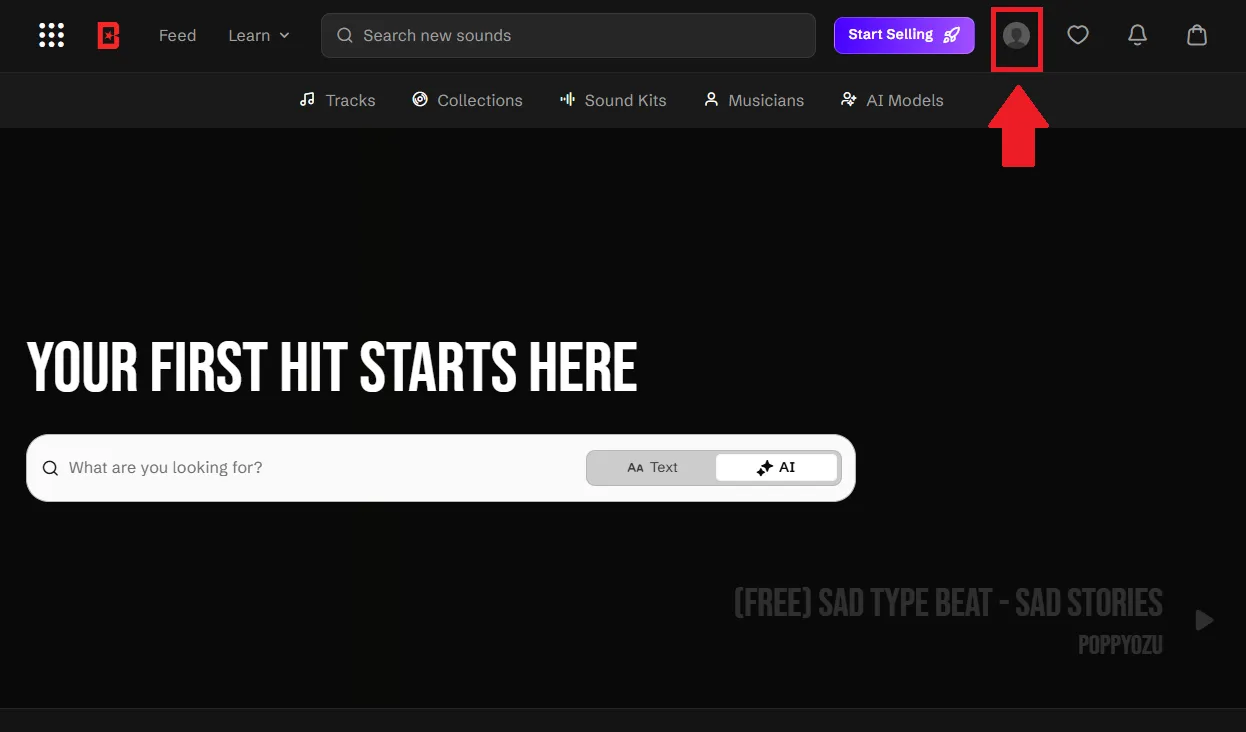
- Click on your profile icon in the top-right corner of the BeatStars homepage.
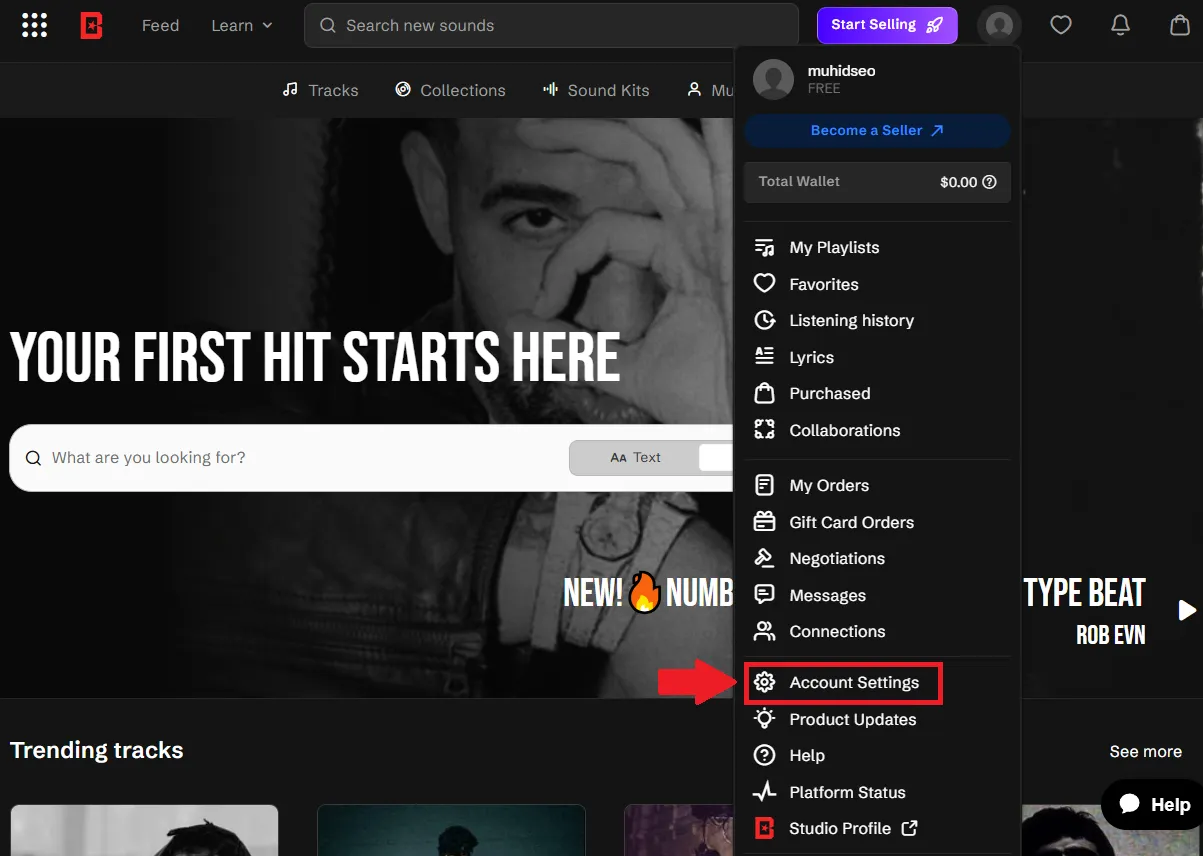
- From the dropdown menu, click “Account Settings” near the bottom of the list.
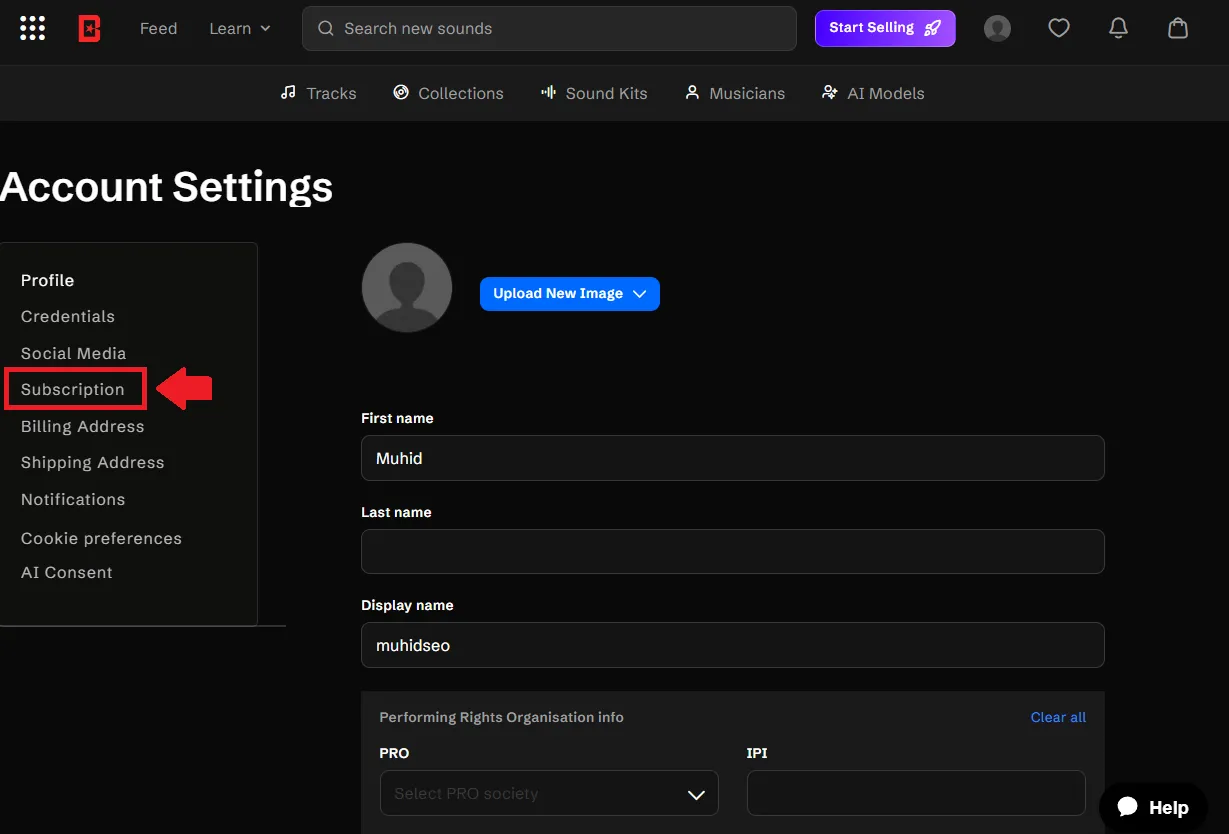
- In the Account Settings sidebar, click on “Subscription”.
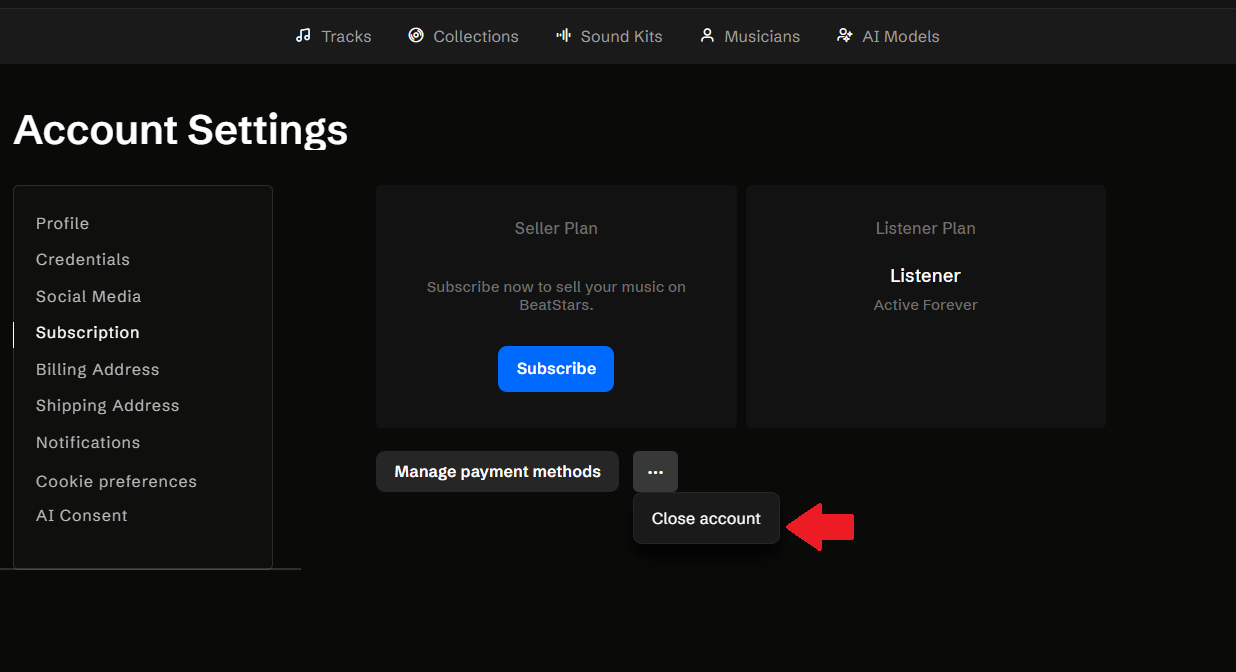
- On the Subscription page, click the three-dot (…) button next to “Manage payment methods”.
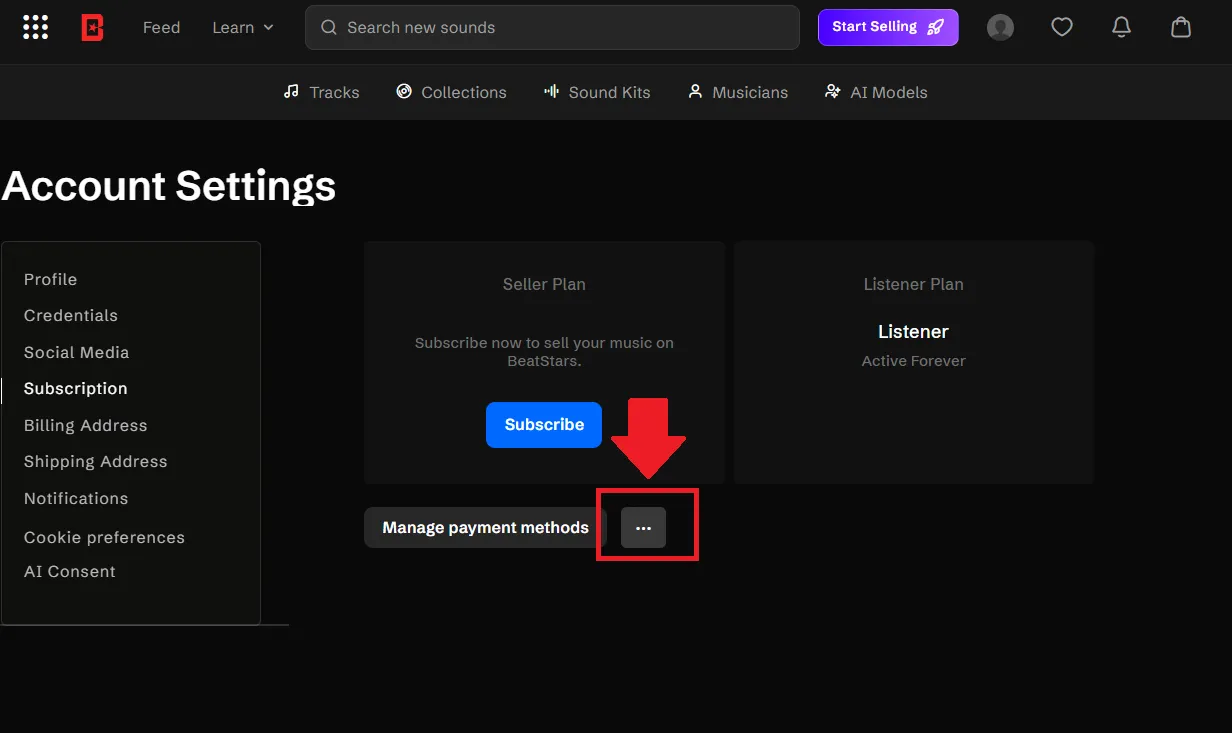
- A small dropdown will appear — click “Close account”.
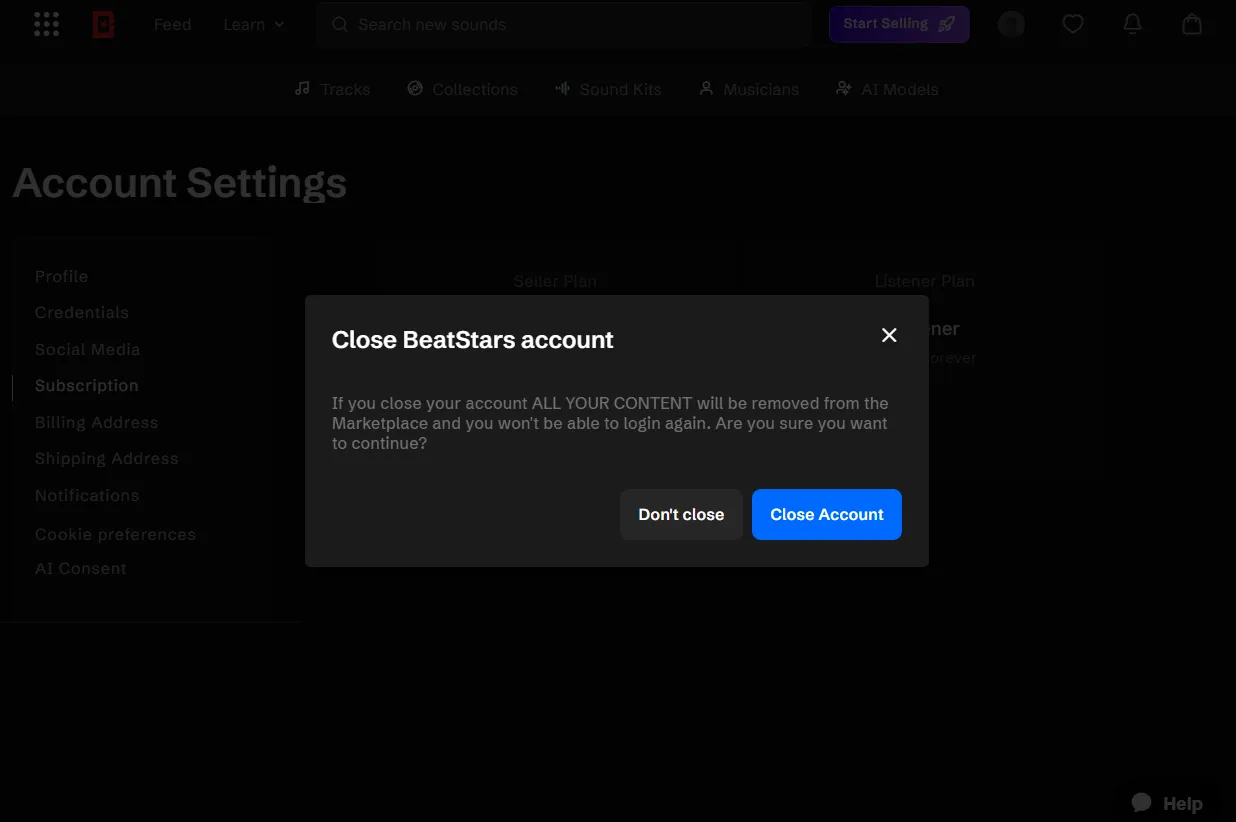
- A confirmation popup will appear warning that all your content will be removed. Click “Close Account” to confirm and permanently close your account.
Method 2: Via Mobile App
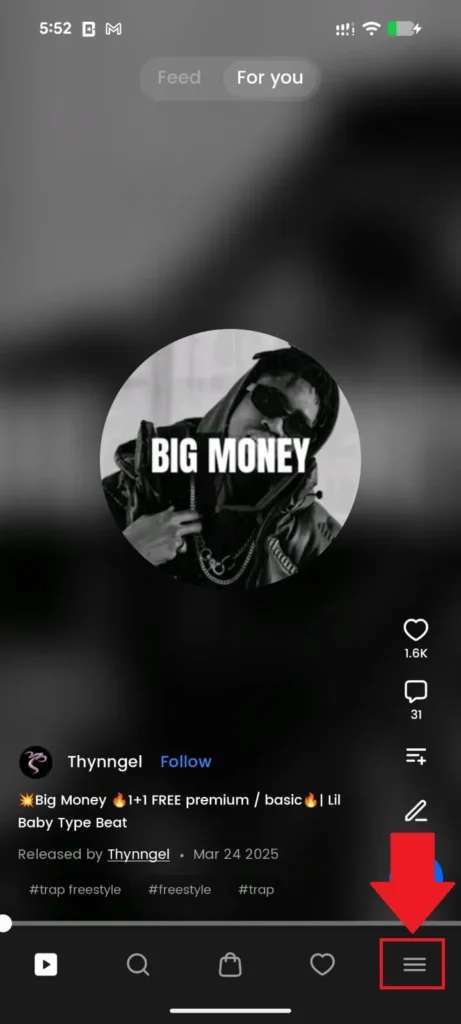
- On the BeatStars app, tap the menu icon (☰) at the bottom-right corner of your screen.
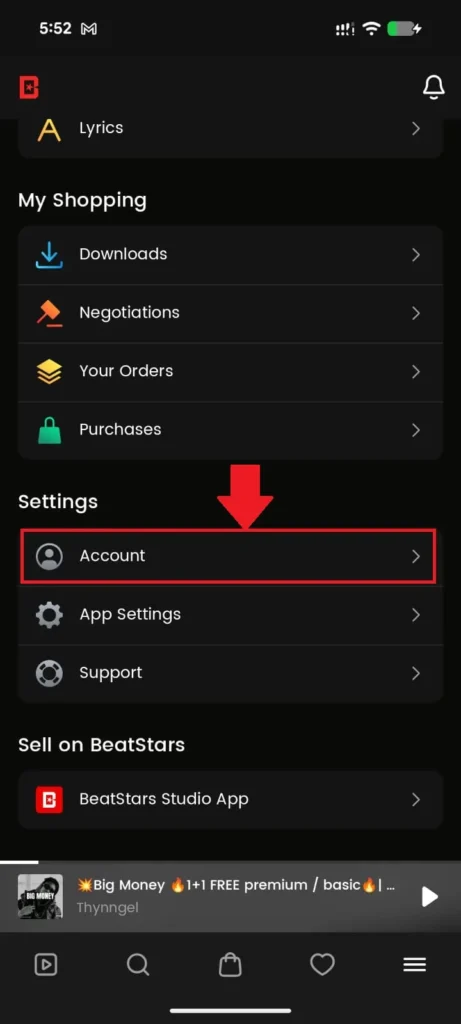
- Scroll down to the “Settings” section and tap “Account”.
- Under the Account settings screen, tap “Credentials”.
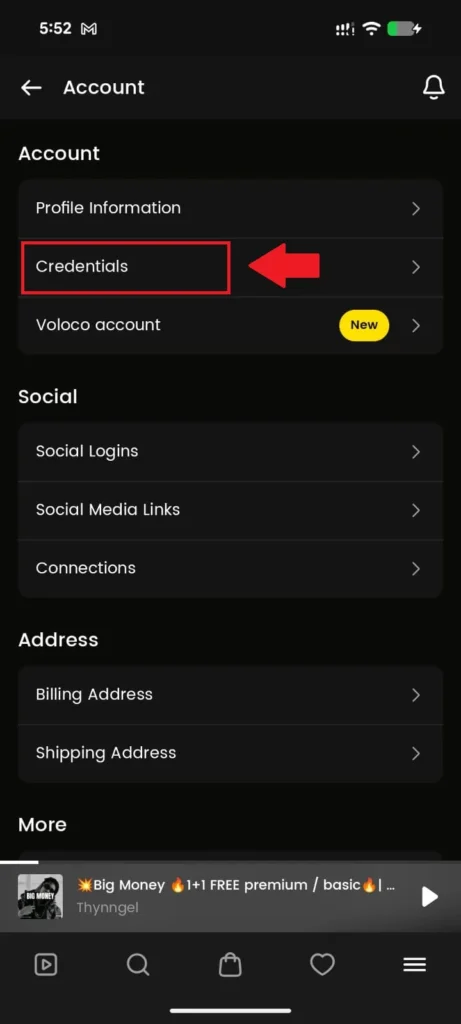
- Under the “Account” section at the bottom, tap “Delete my account” (shown in red) and follow the confirmation prompts to complete deletion.
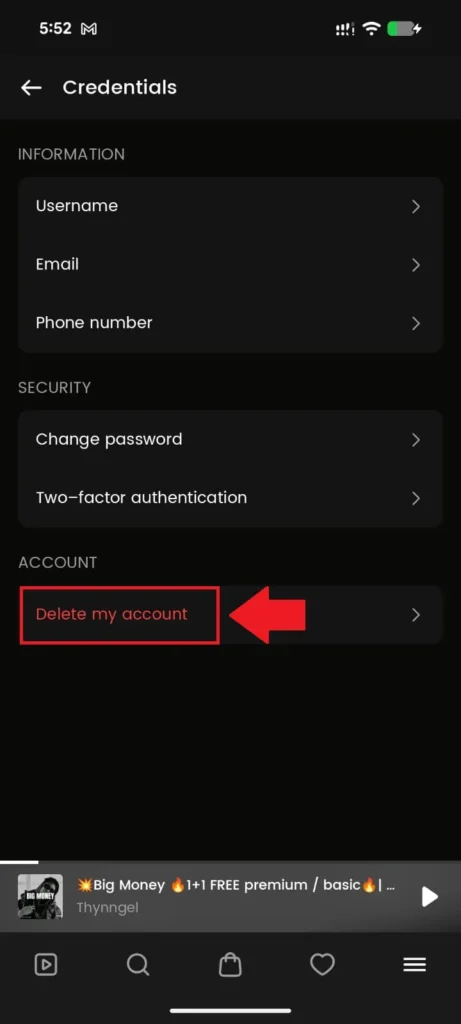
Note: Closing or deleting your account is permanent. All your content, tracks, and data will be removed from the BeatStars marketplace and cannot be recovered.
Alternative Method: Delete BeatStars Account via Support
If you can’t access your account settings or prefer to have the BeatStars team handle it, you can request account deletion directly through their official support channels.
Option 1: Submit a Support Request Online
Head over to https://help.beatstars.com/hc/en-us/requests/new and fill in the form using your registered email address. In the subject line, write “Account Deletion Request” and in the description, include your username and registered email, along with a clear statement that you want your account permanently deleted. Once submitted, the BeatStars support team will follow up with a confirmation.
Option 2: Send a Deletion Request via Email
Compose an email to support@beatstars.com with the subject line “Request to Delete My BeatStars Account”. In the body, include your full name, registered email address, and BeatStars username, then clearly state that you’re requesting permanent account deletion. Send it from the email address linked to your BeatStars account — this is important for identity verification. Expect a response within 2–5 business days.
Deactivate BeatStars Account
Unfortunately, BeatStars doesn’t currently offer a way to deactivate accounts. Deactivation would allow you to keep your profile but temporarily stop it from being active. Since that option isn’t available, deleting the account is the only way to remove your information completely.
Restore account incase of change of mind
No, deleting your BeatStars account is permanent. Once you hit delete, your game progress, scores, and even downloaded songs disappear forever. There’s no way to get them back, so make sure you’re ready to say goodbye for good before hitting that button!
Conclusion
So whether you’ve conquered every song or simply need a break from the rhythm games, deleting your BeatStars account is a straightforward process with clear benefits for your online privacy. By following the steps in this guide and considering the information covered, you can ensure a smooth deletion process. Remember, deleting your account is permanent, but it also empowers you to take control of your digital footprint. So, if you’re ready to hit the final note and say goodbye to BeatStars, this guide has equipped you with the knowledge to do so with confidence! Now go forth and explore new musical horizons (or simply enjoy the peace of a clean digital slate)!
Frequently Asked Questions (FAQs):
Can I delete my BeatStars account?
Yes, you can delete your account, but it’s permanent. Once you delete it, your profile and data are gone for good
How do I delete my BeatStars license?
Unfortunately, you cannot directly delete a BeatStars license. However, you can effectively disable it by setting its price to zero. Here’s how:
- Log in to your BeatStars account.
- Go to the “Active Tracks” section.
- Click the “Edit” button next to the track with the license you want to disable.
- Locate the specific license you want to disable (e.g., Non-Exclusive License, Lease License).
- In the “Price” field for that license, enter “0”.
- Click “Save Draft” to save your changes.
- Finally, click “Publish” to make the changes live.
Is the BeatStars account free?
BeatStars offers a freemium model, meaning they have a free tier with limitations and paid plans with more features
With a free account, you can explore and listen to beats available on the platform as much as you want.
Can you get banned on BeatStars?
Yes, you can get banned on BeatStars.Copyright Infringement, Fraudulent Activity, Abusive Behavior, Spam, Violating Terms of Service could lead to a ban.
If you believe your account was banned in error?
- Contact BeatStars support directly. Explain the situation clearly and professionally.
- Provide any evidence that might help your case, like receipts for purchased licenses if relevant.