
Your MyFitnessPal account is a personal health and nutrition tracker where you log meals, workouts, and progress toward fitness goals. Deleting your MyFitnessPal account involves permanently removing your data, including food diaries, exercise logs, and personal details. This blog provides an overview of what the account entails, the reasons someone might choose to delete it—such as privacy concerns, changing health routines, or app fatigue and a step-by-step guide on how to do so. By offering clear instructions and context, this post helps users make informed decisions about managing their digital wellness tools.
Things To Consider Before Deleting Your MyFitnessPal Account
- Data Loss: Deleting your account will permanently erase all your logged data, including food diaries, exercise records, and progress history.
- Subscription Status: If you have a premium subscription, cancel it first to avoid future charges.
- Linked Apps: Disconnect any third-party apps or devices (like Fitbit or Apple Health) that are synced with your account.
- Progress Tracking: Consider whether you’ll lose access to useful insights or progress metrics that have helped with your fitness journey.
- Exporting Data: You might want to download or back up your data before deletion if you need it for future reference.
- Temporary Deactivation Option: If you’re unsure, consider taking a break instead of deleting the account permanently.
What Happens When I Delete My Account?
When you delete your MyFitnessPal account, the following happens:
- Permanent Data Loss: All your personal data, including food logs, exercise history, progress photos, and custom goals, will be permanently deleted. You will lose access to all saved meals, recipes, and settings.
- Loss of Premium FeaturesIf: you have a premium subscription, it will be canceled, and you will no longer be charged. However, you may need to cancel the subscription separately through your app store or payment provider to avoid future charges.
- No Access to Your Account:Your account will be permanently removed, and you will no longer be able to log in or access any of the features associated with MyFitnessPal.
Any data tied to your account, such as integration with third-party apps (like Fitbit or Apple Health), will be disconnected.
- Inability to Recover the Data:Once deleted, the data cannot be restored. If you change your mind after deleting your account, you’ll have to start fresh with a new account.
- Removal from MyFitnessPal Community: You will no longer be part of the MyFitnessPal community and won’t be able to interact with other users, participate in challenges, or access support forums.
Follow Step-By-Step Process To Delete MyFitnessPal Account
Method 1: Delete via Mobile App
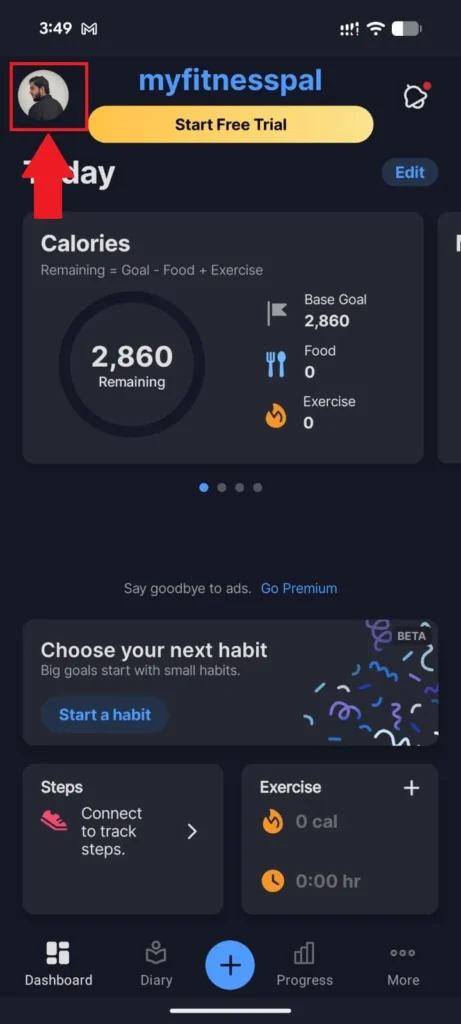
- Open the MyFitnessPal app and tap your profile picture at the top left of the dashboard.
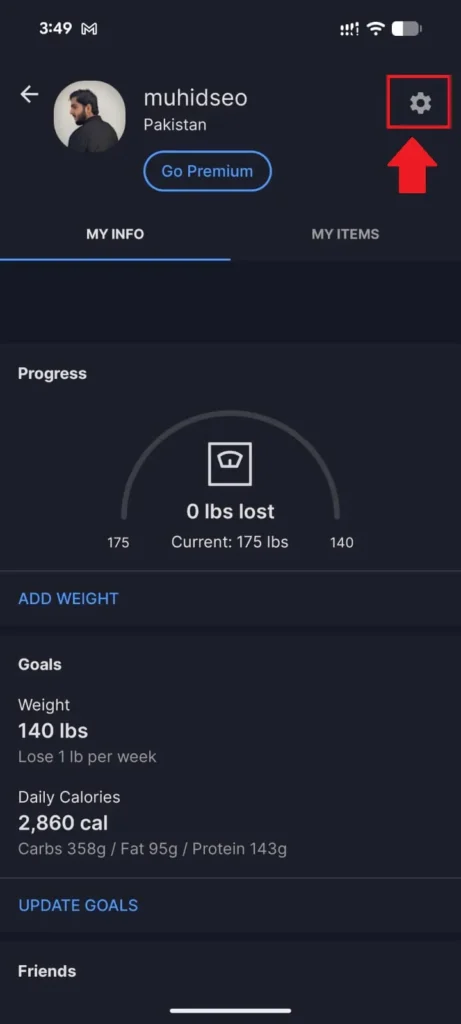
- On your profile page, tap the Settings (gear) icon at the top right corner.
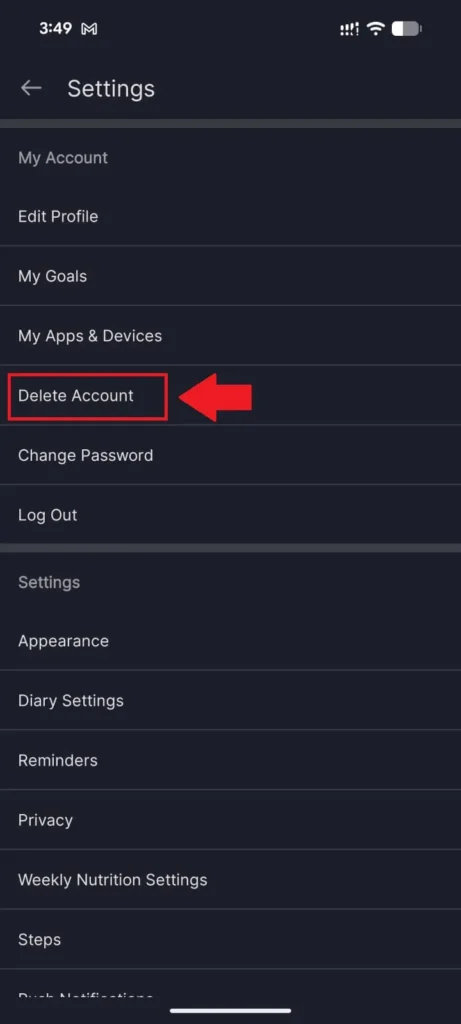
- In the Settings menu, scroll down and tap Delete Account under the My Account section.
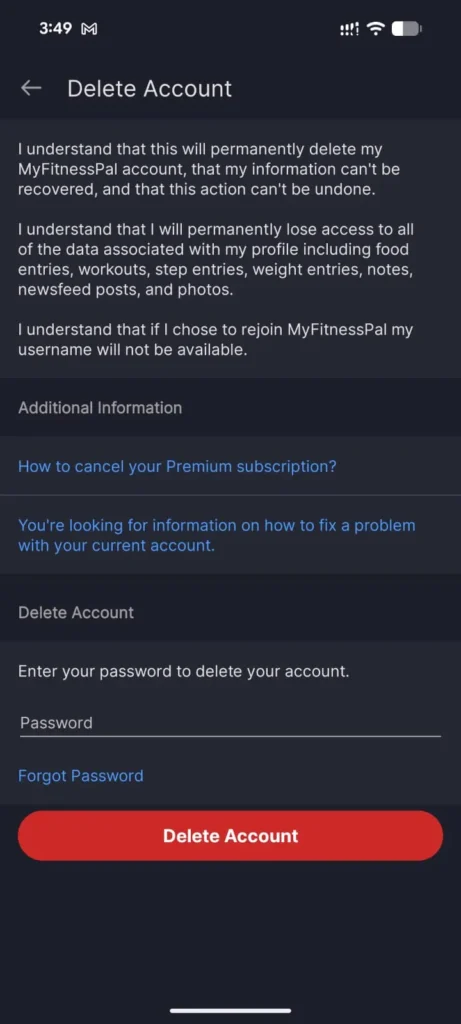
- Read the deletion warnings, enter your password in the field provided, and tap the red Delete Account button to confirm.
Method 2: Delete via Website
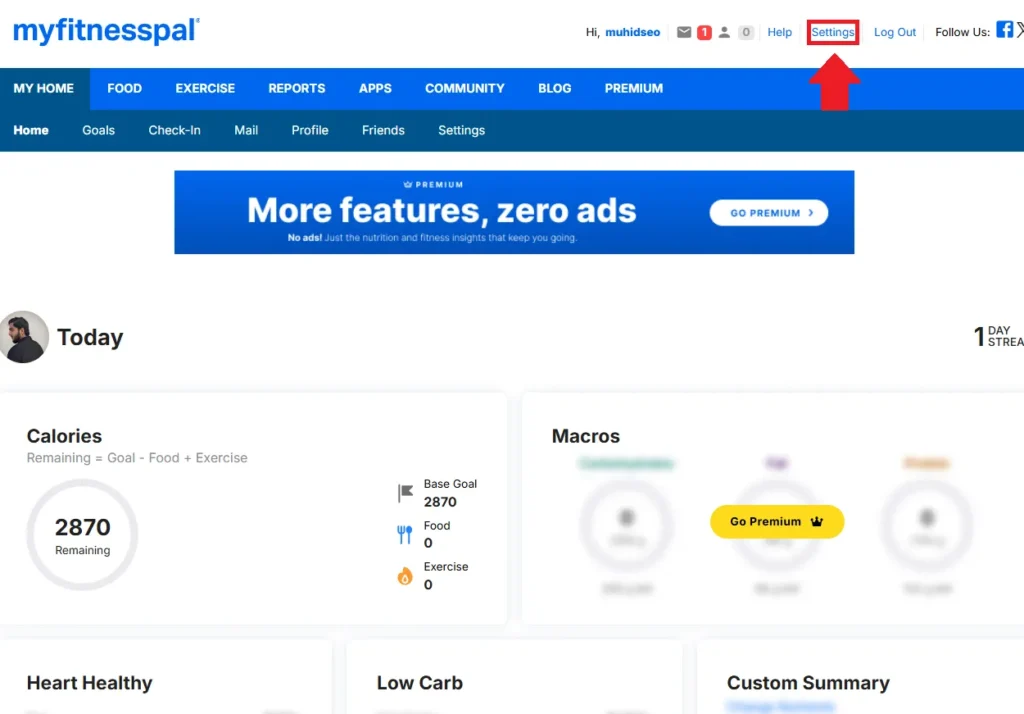
- Log in to MyFitnessPal on your browser and click Settings in the top right navigation bar.
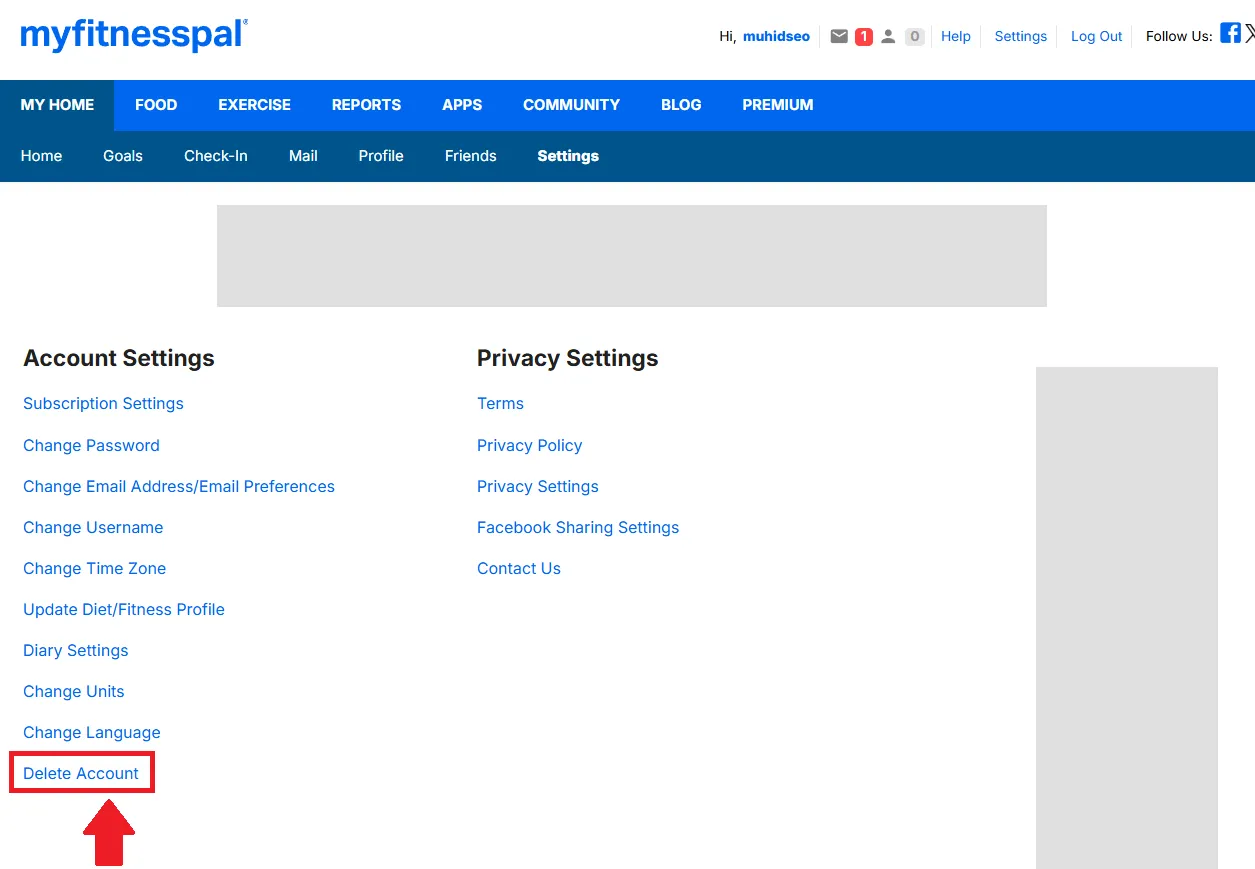
- On the Settings page, scroll down under Account Settings and click Delete Account.
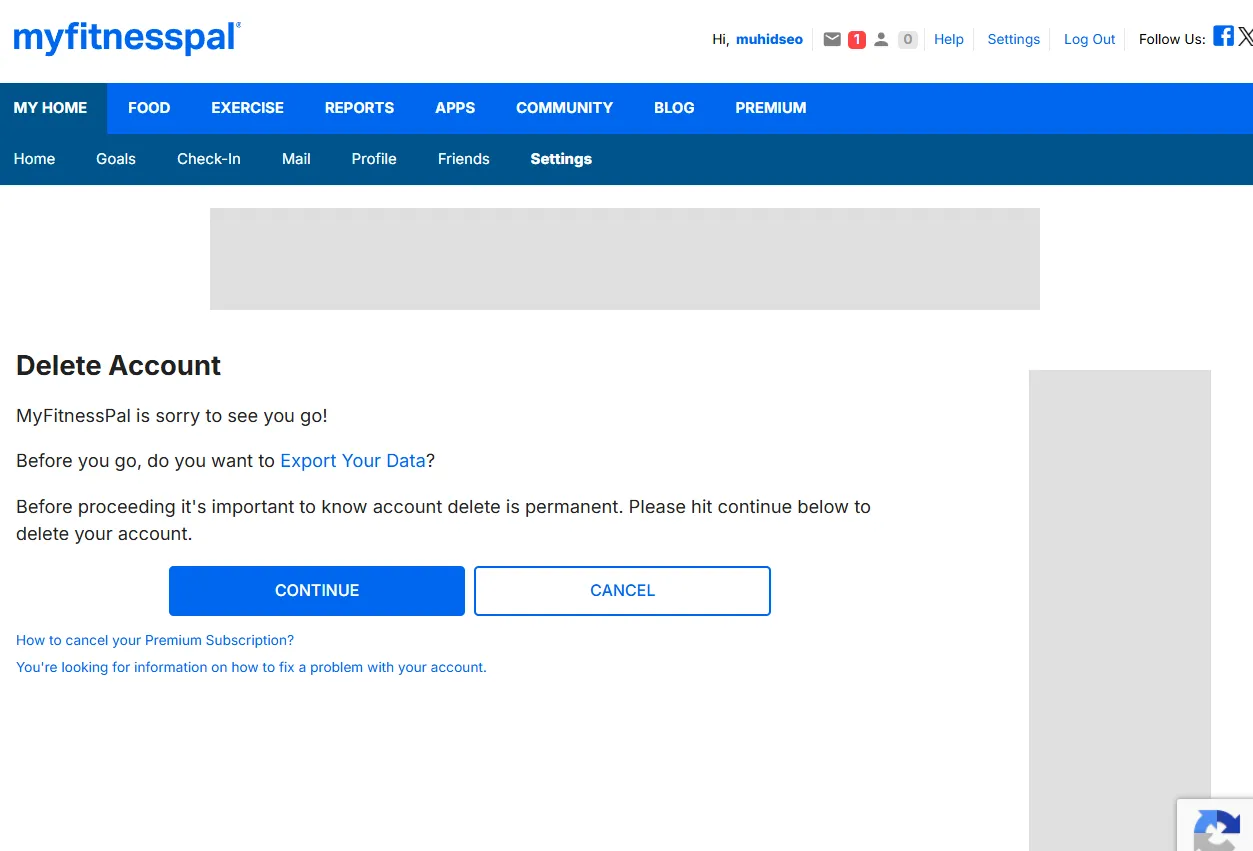
- You’ll land on the Delete Account page. Click Continue to proceed with the deletion.
- A confirmation popup will appear. Check all three acknowledgment boxes and click Delete My Account to permanently delete your account.
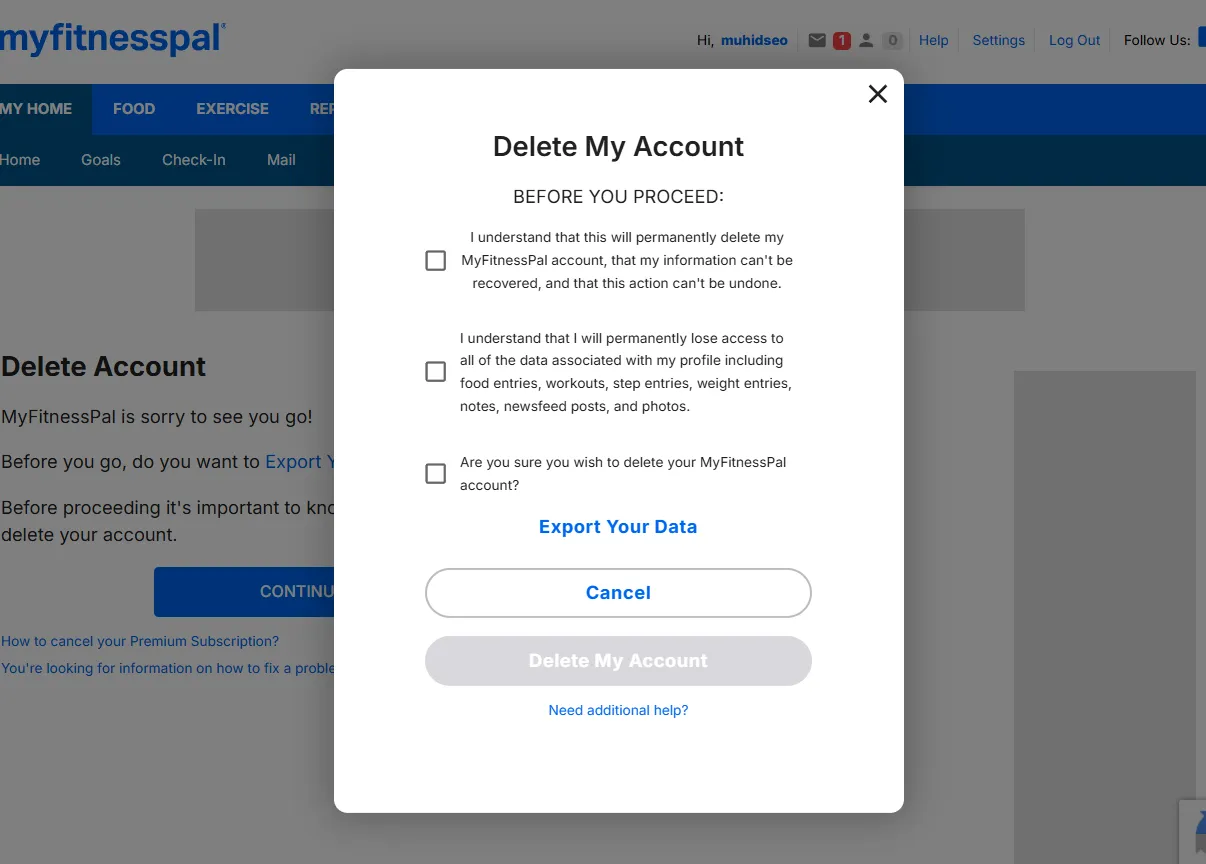
Before you proceed: If you’re on a Premium subscription, cancel it first. Deleting your account does not automatically cancel billing. You’ll also permanently lose all food entries, workouts, weight logs, and other tracked data — this cannot be undone.
Alternative Way to Delete Your MyFitnessPal Account
If you’re unable to delete your account through the app or website, you can send a deletion request directly to MyFitnessPal’s support team at support@myfitnesspal.com. In your email, include your registered username and email address, and clearly state that you want your account permanently deleted. Keep the response email from their team as confirmation that your request has been processed. This method is particularly useful if you’ve lost access to your account or are running into issues with the standard deletion process.
Deactivate My FitnessPal Account
MyFitnessPal doesn’t offer a direct “deactivation” option. Instead, if you want to take a break without permanently deleting your account, you’ll need to either stop using the app and leave your account inactive or delete your account entirely. However, you can stop receiving emails and notifications, which can give you a break from the app without removing all your data.
Restore Account Incase Of Change Of Mind
MyFitnessPal does not offer an option to restore data after account deletion. Once your account is deleted, all your personal data, including food logs, exercise history, progress photos, and custom goals, is permanently lost and cannot be recovered. This is why it’s essential to be absolutely certain before deleting your account.
Conclusion
In conclusion, deleting your MyFitnessPal account is a permanent action that removes all your personal data, including meal logs, exercise records, and progress tracking, with no option for recovery. If you’re sure that you no longer want to use the app, this process is straightforward but irreversible. Before making the decision, it’s worth considering whether you could instead deactivate notifications, take a break, or export your data for future reference. If you’re still uncertain, take the time to evaluate your reasons for leaving to ensure that deleting your account is the best choice for your needs.