
Ever uploaded your music to streaming services like Spotify or Apple Music? If you did it yourself, there’s a good chance you used TuneCore! It’s a handy tool that lets musicians like you distribute their music to all the popular platforms. But what if you’re done using TuneCore? Maybe you switched distributors, decided to take a break from music, or simply don’t need it anymore. Here’s the thing: just leaving an inactive account hanging around can be a security risk. Your information is still stored on their servers, which means there’s a chance of a data breach exposing your personal details like email address or even payment information. If you’re sure you don’t need TuneCore anymore, deleting your account is the best way to go. This Techy Manual blog post will walk you through the process step-by-step, so you can remove your account completely and ensure your privacy is protected.
Things To Consider Before Deleting Your TuneCore Account
Saying goodbye to TuneCore can be a good idea, especially if you’re no longer distributing music. But before you hit delete, there are a few things to check off your list to make sure you don’t lose anything important:
Back Up Your Releases:
If you’ve uploaded any music through TuneCore, you’ll want to download it all to your own computer before deleting your account. Think of it like moving out of an apartment; you wouldn’t leave your furniture behind, right? Once your account is gone, those songs will be gone too.
Cancel Your Subscription (if applicable):
Are you currently paying for a TuneCore subscription plan? Make sure to cancel it before deleting your account. This way, you won’t get charged for a service you’re not using anymore. It’s like stopping the newspaper delivery when you move – no more surprise bills!
Unlink Social Media Accounts (Optional):
Did you connect your TuneCore account to any social media profiles like Facebook or Twitter? If so, you might want to unlink them before deleting your account. This ensures those other platforms aren’t trying to access a non-existent account anymore. Imagine it like updating your contact information – you wouldn’t want people trying to reach you at an old email address.
By following these simple steps, you can ensure a smooth and secure transition when deleting your TuneCore account. Once you’re done, this blog post will guide you through the deletion process itself, making it a breeze to say farewell to TuneCore.
What Happens When I Delete My Account?
Hitting delete on your TuneCore account means permanently removing it from their system. Here’s what you need to know about what happens after:
Music Distribution Stops:
Say goodbye to your music being streamed on platforms like Spotify or Apple Music. Once your account is deleted, TuneCore won’t be able to distribute your music anymore. Think of it like taking down your music from a record store – it won’t be available for purchase or listening after that.
Data is Erased:
TuneCore will delete any information associated with your account, including your login details, billing information, and any unreleased music you might have stored on their servers. Imagine it like shredding old documents – there’s no getting them back once they’re gone.
No More Service:
You won’t have access to any of TuneCore’s services anymore. This includes features like sales reports, royalty tracking, or managing your artist profile (if you had one). It’s like canceling your cable TV – you lose all the channels you used to enjoy.
Account Recovery Not Possible:
If you have a change of heart later and want your music back online, you won’t be able to recover your deleted TuneCore account. It’s a one-way street! So make sure you’re absolutely positive before hitting delete. Think of it like closing a bank account – you can’t just reopen it with a snap.
Now, deleting your account can be a good thing for security, especially if you’re no longer using it. But it’s important to be aware of what you’re giving up before taking the plunge. This way, you can make an informed decision and ensure a smooth transition. If you’re sure you want to proceed, this blog post will show you exactly how to delete your TuneCore account step-by-step.
Follow Step-By-Step Process To Delete TuneCore Account
Unfortunately, TuneCore doesn’t offer a direct option to delete your account through their website or app. However, you can close your account by contacting their support team. Here’s how:
- First, visit the TuneCore website , and log into your account
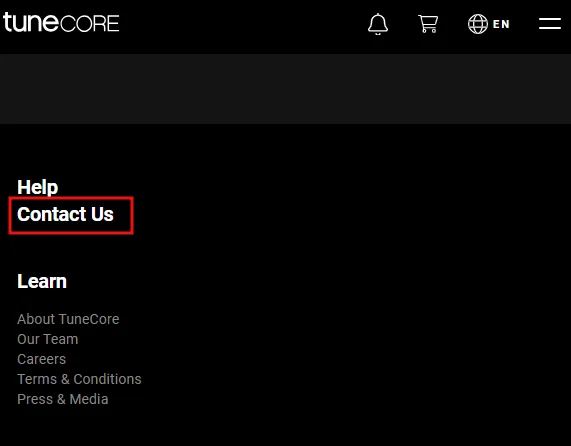
- Click the Contact Us button at the end of the page, this will take you to TuneCore support website, or, you can visit https://support.tunecore.com/hc/en-us/articles/115006501747-Contact-Us.
- Now, click on Submit a Request button.
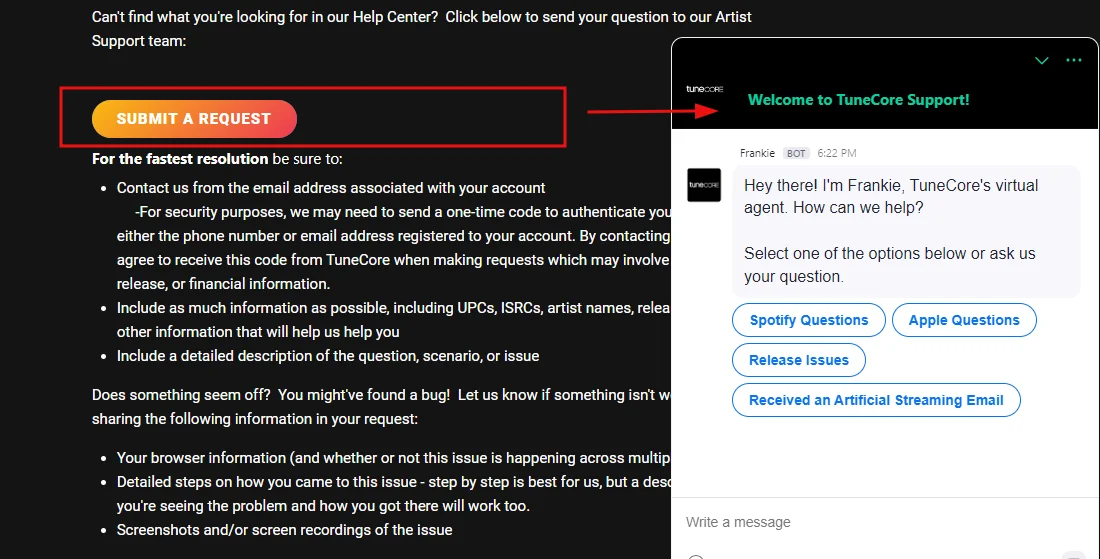
- In the message clearly state that you want to close your TuneCore account
- Account closure processing time might vary. TuneCore’s support team will guide you through the process and provide an estimated timeframe for completion.
Alternative Way To Delete Tunecore Account
Send an email to support@tunecore.com from your registered TuneCore email address with the subject line “Account Deletion Request – [Your Email]” and include your full name, username, UID, any third-party login used (Google/Facebook), and a clear statement requesting permanent account deletion. If you’re in the EU or California, add a line invoking your GDPR or CCPA right to erasure — it speeds things up. Make sure you’ve withdrawn any pending earnings before sending, as they won’t be recoverable once the account is closed. TuneCore support typically responds within 5–7 business days; if not, follow up in the same thread.
Deactivate TuneCore Account
Unfortunately, TuneCore currently doesn’t offer a way to simply “deactivate” your account. It’s either all or nothing – you can either keep your account active or delete it completely.
This blog post will focus on the deletion process for those who are sure they want to say goodbye to TuneCore. However, if you’re unsure about complete deletion, you might want to consider contacting TuneCore support directly. They might be able to offer alternative solutions depending on your specific situation.
Restore account incase of change of mind
No, once you delete your TuneCore account, it’s gone for good. This includes your music, data, and access to services. So, make sure you’ve downloaded everything important and are absolutely certain before hitting delete, as there’s no way to get your account or music back up and running.
Conclusion
Saying goodbye to TuneCore can be a smart move, especially if you’re no longer distributing music. By following the steps in this guide, you can be sure your account and data are completely removed. Remember, deletion is permanent, so make sure you’ve downloaded any important music and are confident in your decision. If you’re all set, follow the instructions for contacting TuneCore support and they’ll help you with the final farewell. Take control of your online presence and delete your TuneCore account with confidence.
Frequently Asked Questions (FAQs):
What happens if you cancel TuneCore?
Canceling TuneCore means your music fades from streaming services and stores eventually (renewing keeps it live). Your account goes inactive but your info might be stored. New releases are on hold until you reactivate with a subscription. Any royalties earned before cancellation will still be sent according to their schedule.
What are the disadvantages of TuneCore?
TuneCore’s popularity hides limitations. For features like analytics or mastering, you’ll need extra fees or another platform. Their subscription might not be ideal for occasional releases, and customer support can be slow.
Will TuneCore delete my music?
To keep your music available on streaming services and stores, you need to renew your TuneCore subscription before the renewal date. Don’t worry, TuneCore will send you reminder emails beforehand so you have plenty of time. But if the payment isn’t received by the deadline, your music will be taken down.