
The “Joining” or “Creation” date on Facebook holds significant importance as it serves as a digital timestamp indicating when a user first became part of the platform or when a page was created. It provides a sense of authenticity and credibility, as a long-standing profile or page often appears more trustworthy. For businesses and public figures, the creation date can indicate the history and evolution of their brand or presence on social media. On a personal level, it can evoke nostalgia, marking the beginning of one’s social media journey. Understanding the creation date’s role involves recognizing its value in establishing online legitimacy and continuity. In today’s digital age, where fake profiles and misinformation are prevalent, such timestamps help distinguish genuine accounts from impersonators. Transitioning from casual use to acknowledging its deeper relevance shows how small details can significantly impact user experience and brand perception online.
The Importance Of Joining Or Creation Date On Facebook:
On Facebook, two types of account present one is as an individual and other is business account , details are mentioned below:
Of Individual
Of Company or brand
Find Your Own Facebook Joining Date
Finding your own Facebook joining date can be a nostalgic experience, taking you back to when you first became part of the social media platform. The joining date is typically listed in your profile’s “About” section, under “Contact and Basic Info.” This timestamp serves as a reminder of how long you’ve been connected to the Facebook community, marking the beginning of your social media presence. Knowing your joining date can provide a sense of personal history, as well as context for how your social media habits and connections have evolved over time, reflecting the growth of your digital life.
About Section:
To find your Facebook joining date through the “About” section, follow these steps:
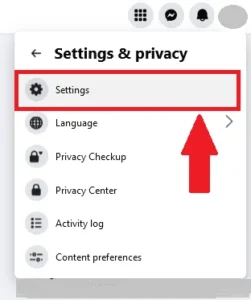
- Log in to your Facebook account and go to your profile by clicking on your profile picture or name and go to the settings & privacy.
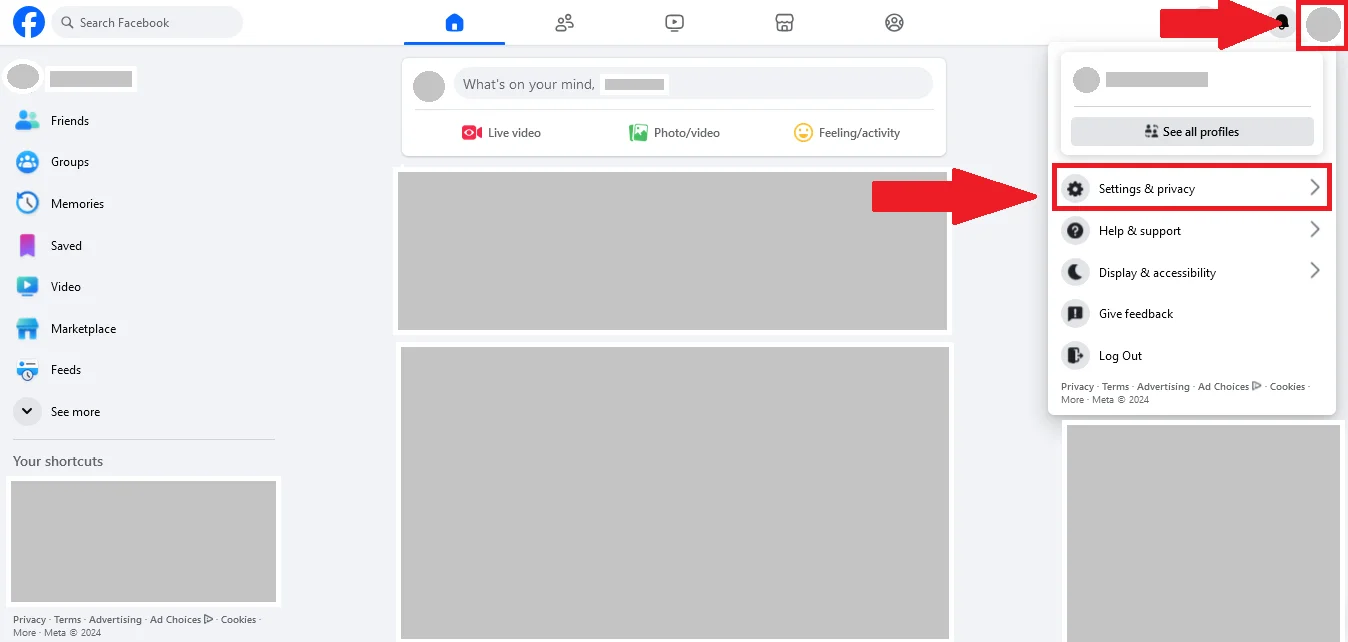
- After setting & privacy tap on settings.
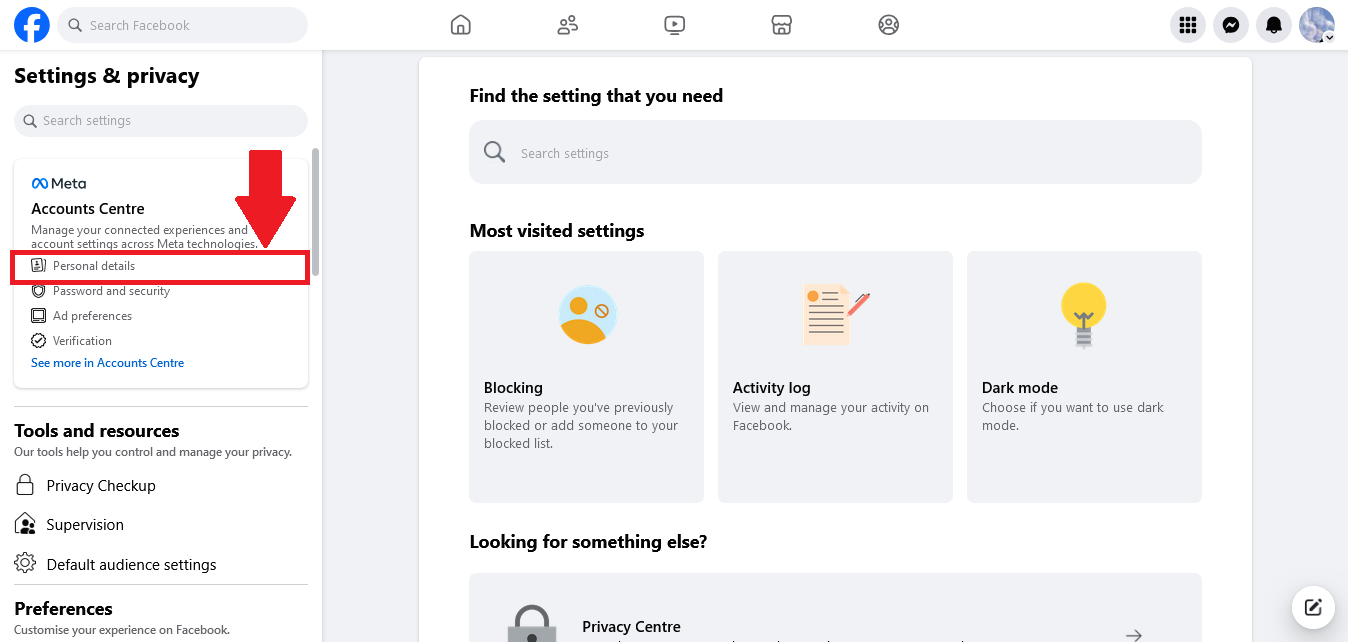
- After settings click on personal information mentioned on account centre.
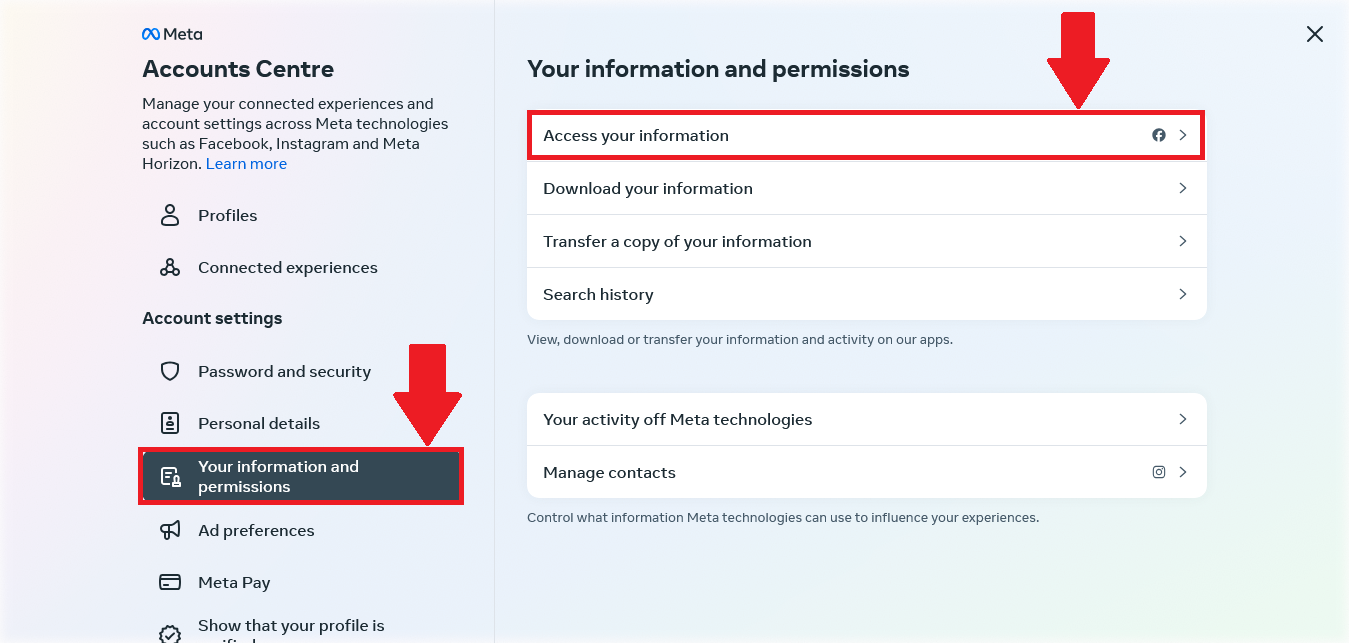
- On the page on account center select your information and permissions, tap on access your information here.
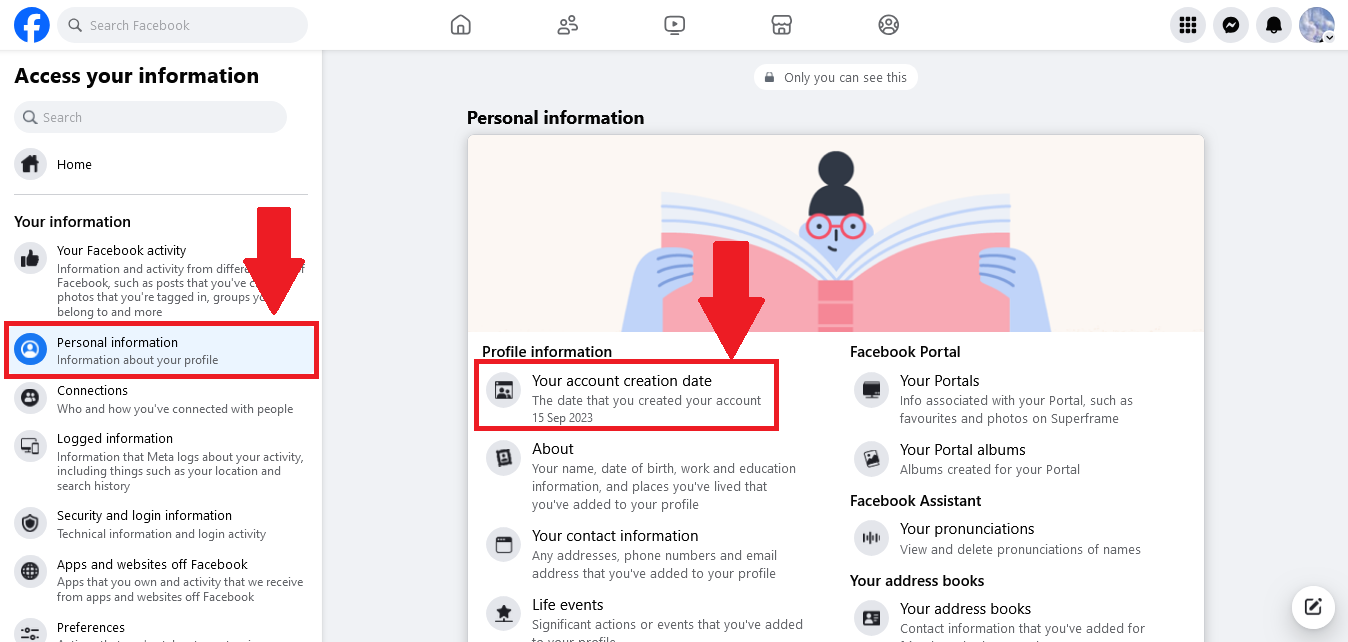
- On this tab, go on to personal information and In personal information, you can find your account creation date.
Activity Log:
- Log in to your Facebook account and go to your profile by clicking on your profile picture or name and go to the settings & privacy.
- After that click on the activity log.
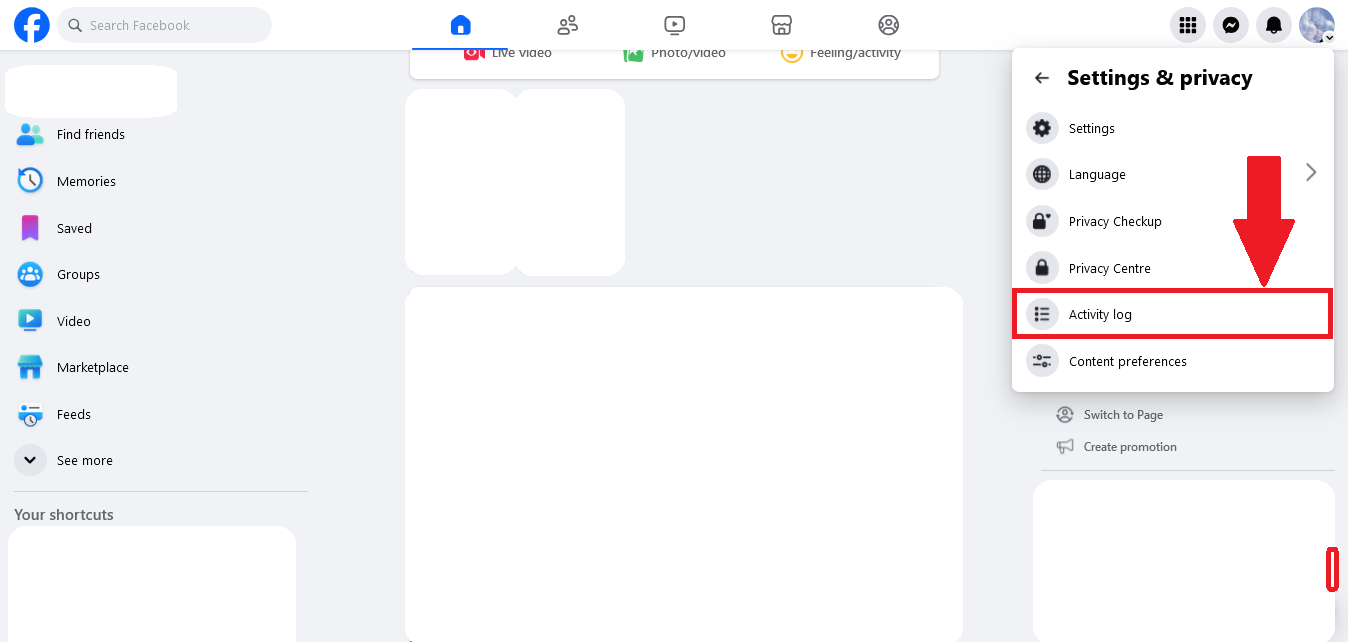
- On this page, click on profile information .
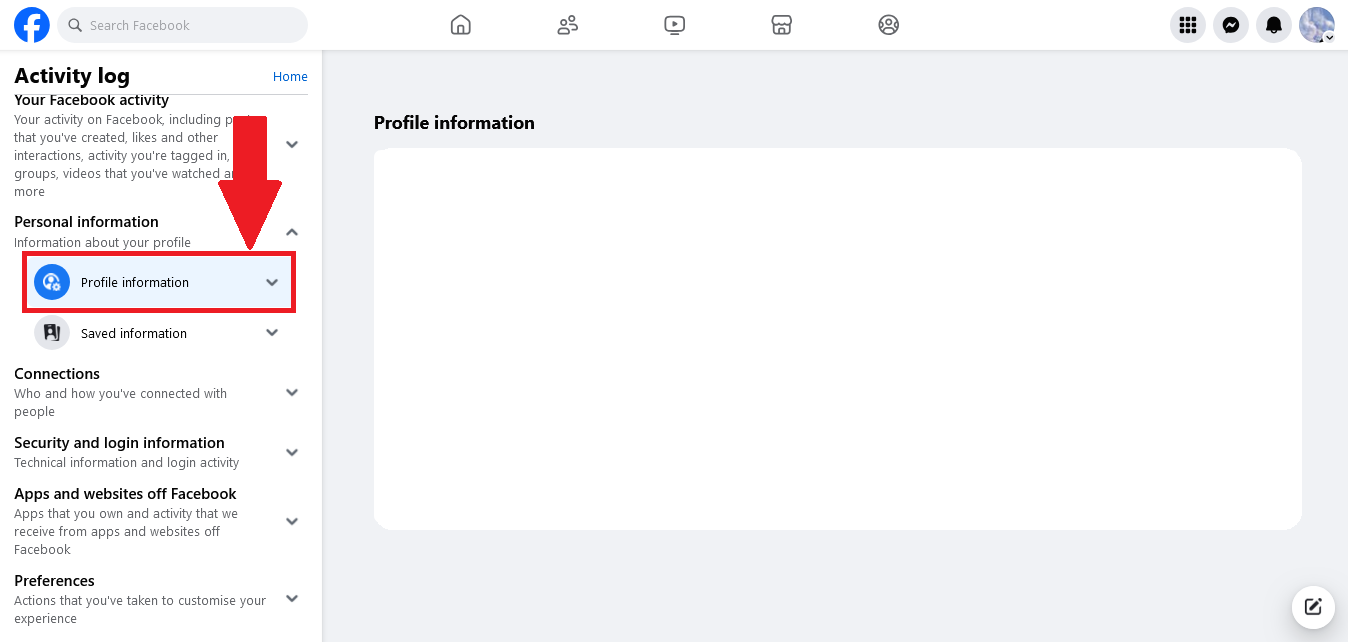
- Tap on the filter and click on all.
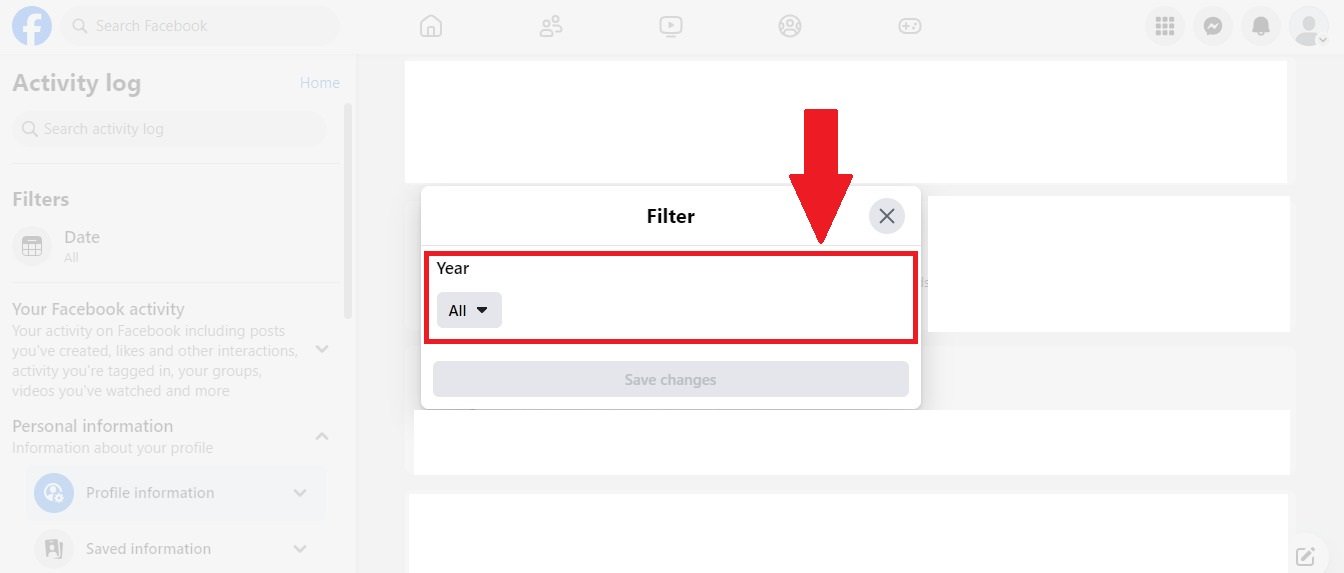
- Scroll down on last year shown that is Facebook creation year of your Facebook profile.
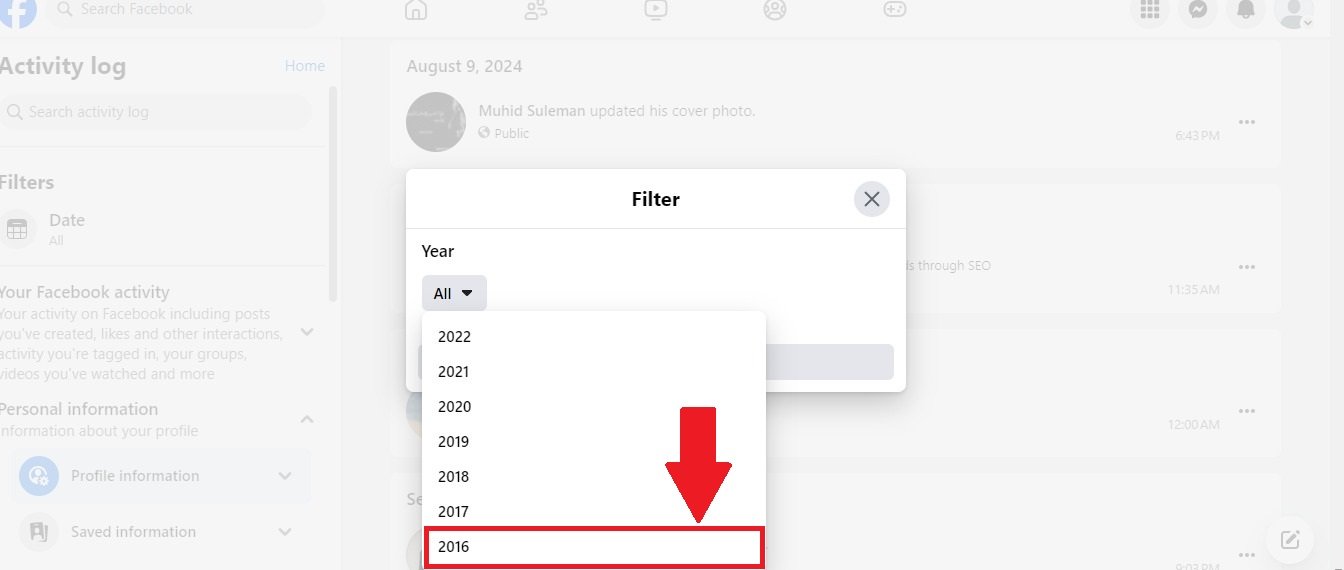
Through Joining Email:
Finding your own Facebook profile creation date through the joining email can be a straightforward process that adds a personal touch to your social media experience. When you first signed up for Facebook, a welcome email was sent to the email address you used for registration, which typically includes the date of account creation. By searching your inbox for this welcome email or checking your email account’s sent folder, you can easily identify the exact date you joined Facebook, offering a nostalgic glimpse into your journey on the platform.
Find Someone’s Facebook Joining Date
Finding someone’s Facebook joining date can provide insights into their social media history and engagement level on the platform, helping you understand how long they’ve been part of the Facebook community. This context can be valuable in various situations, such as networking, making new friends, or assessing the credibility of profiles, as a longer membership may suggest more established connections and experiences on the platform. We can find Facebook joining date of your friends or another person’s joining date by different method, these are mentioned below:
On the Profile:
Facebook does not publicly display a user’s joining date on their profile. While some users might share a “Facebook anniversary” post that indicates when they joined, it’s not a feature that’s visible on every profile. This detail remains private unless the user decides to share it. We can see Facebook joining date on the profile by following step:
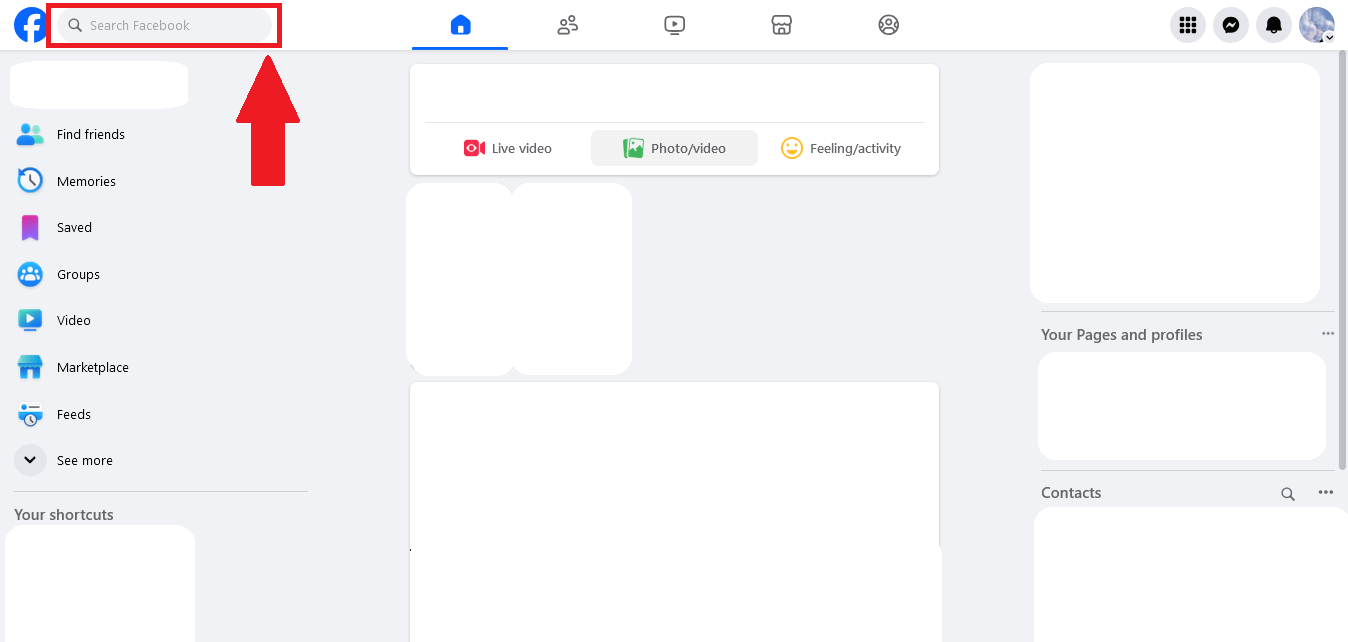
- Go on your Facebook account search for a person or friend ID on your friend or person’s profile.
- Have a look into the intro where you can easily find the joining date of Facebook.

Third-Party Tools:
Finding someone’s Facebook joining date using third-party tools is generally not recommended. Most third-party tools or services that claim to provide such information often violate Facebook’s terms of service and may pose privacy risks or even be illegal in some jurisdictions. These tools may also require access to sensitive information, potentially leading to security and privacy concerns.
The best way to find out when someone joined Facebook is through the information they’ve shared on their profile (like “Life Events”) or directly asking the person. Using third-party tools for this purpose is neither reliable nor ethical.
Ask the User Directly:
To find out someone’s Facebook joining date by asking them directly, you could simply send a polite message or ask in person. This approach respects the user’s privacy and gives them the choice to share the information. It’s much more personal and considerate than using third-party tools.
First Post (estimation not exact):
To estimate someone’s Facebook joining date, you can look for their earliest post on their profile. Scroll down their Timeline to find the first post, photo, or “Life Event” they shared. This might give you a rough idea of when they started using Facebook, although it won’t be exact, as the user may have deleted older posts or not posted immediately after joining.
- Go to the Facebook profile of the person whose joining date you want to find.
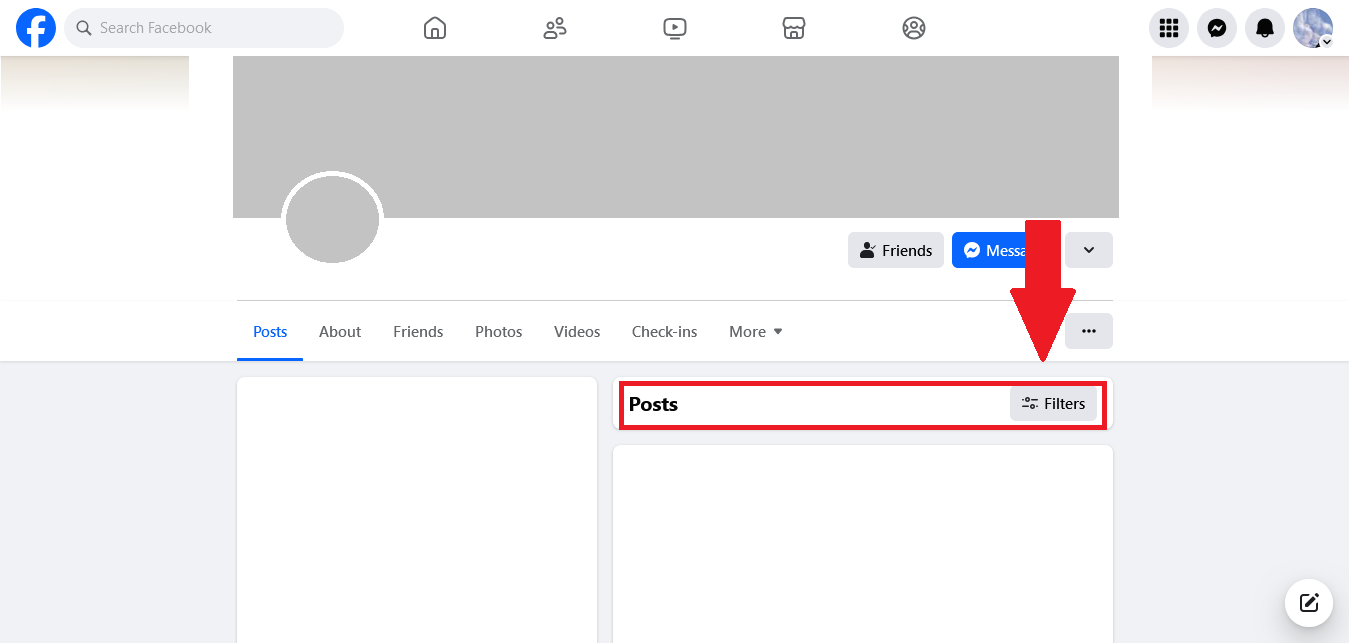
- On the right-hand side, you’ll see a post tap on the filter and you will find a list of years. Click on the earliest year available to jump to older posts.
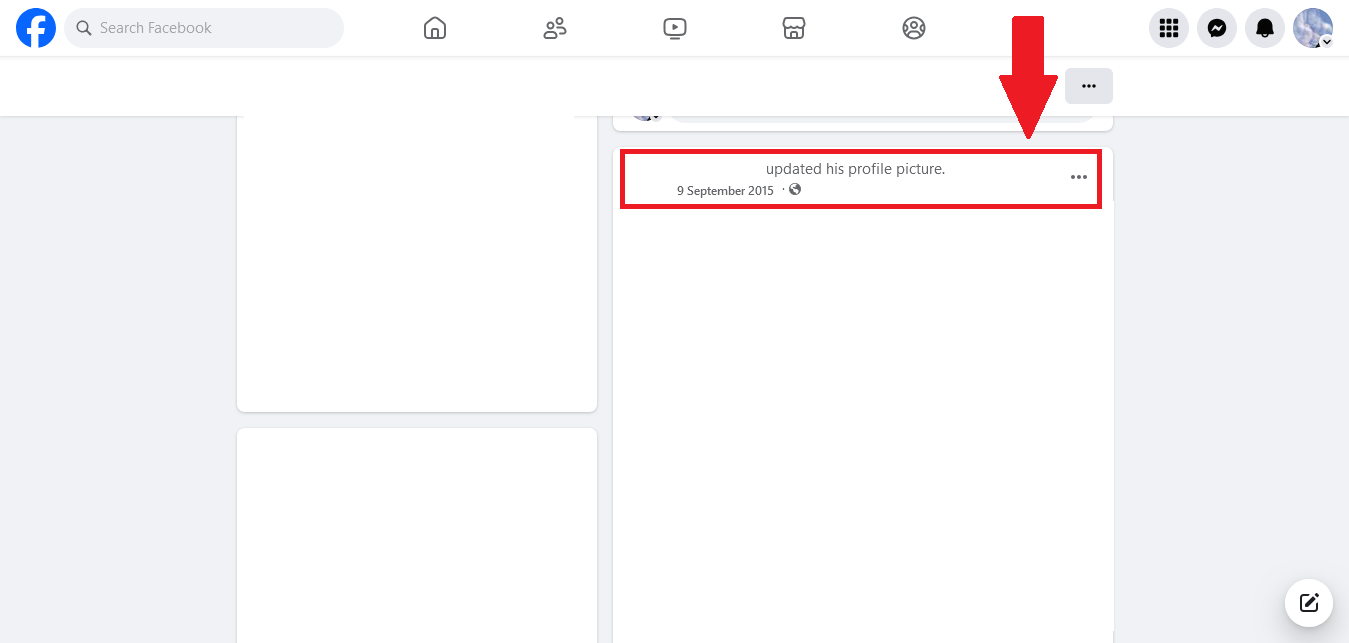
- Once in the earliest year, scroll to the very bottom to find the first post. This will likely be close to the person’s Facebook joining date. The date of the first post provides an estimated joining date, although it may not be exact.
Find Facebook Page Creation Date
To find the creation date of a Facebook Page, you can use several methods, including checking the Page Transparency section, Page Insights (for admins only), and the Way back Machine. Using these methods, you can effectively determine the creation date of a Facebook Page and gain insights into its history and activity.
Here’s the details of these methods:
Page transparency Section:
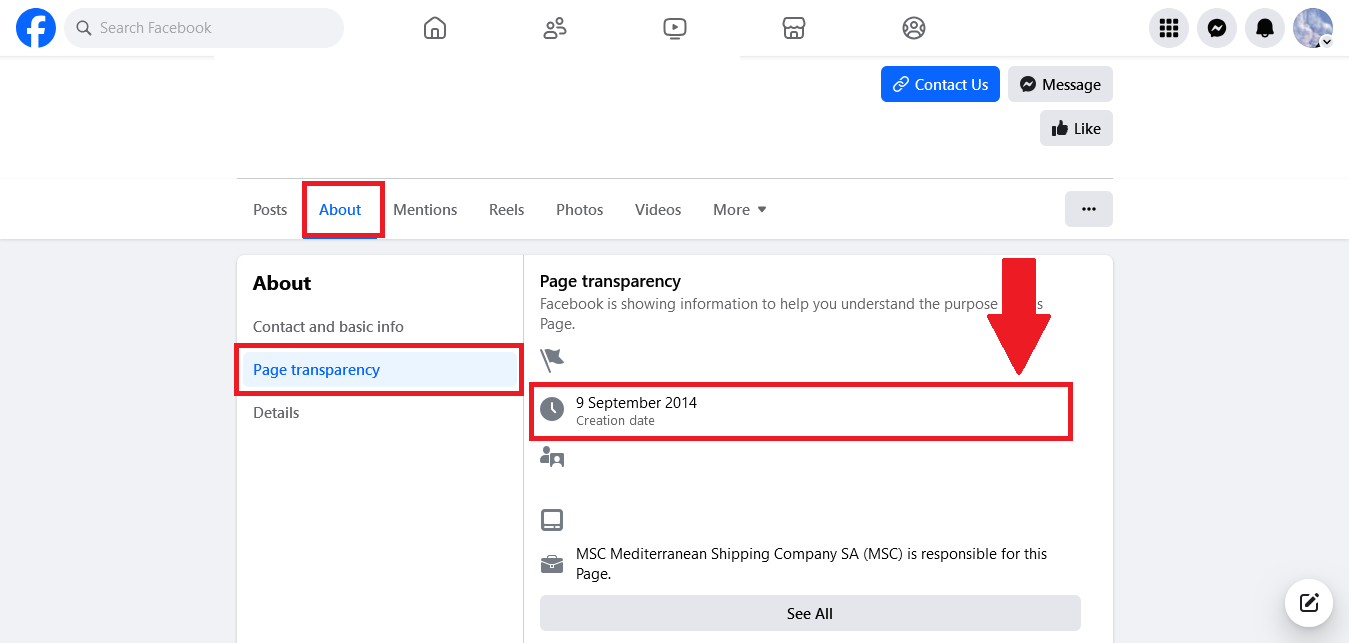
The “Page Transparency” section on Facebook provides insights into the history and management of a Facebook group or page. It includes information such as, The creation date of the group or page, showing when it was first established. Changes to the group’s name, if applicable, including a history of last name changes. Country locations of the group’s admins, giving an idea of where the administrative team is based. For groups linked to Facebook pages, the “Page Transparency” section helps users understand the background and authenticity of the page by offering transparency about its history and management practices.
- Go on the group page. Click on about, tap on page transparency. Here you can see the creation date on the particular group date.
Page Insights (For Admins Only):
If you are an admin of the Facebook Page, you can access Page Insights, which includes detailed analytics and metrics about the page’s performance. Within Insights, you can often find information about the page’s history, including its creation date. To do this, navigate to the “Insights” tab at the top of the page and look for the “Overview” section or similar areas that might provide historical data.
Way back Machine (Internet Archive):
The Way back Machine (Internet Archive) is another useful tool for estimating a Facebook Page’s creation date. The Way back Machine may not have many archived versions of Facebook groups due to Facebook’s privacy settings and crawling restrictions. Also, if the group was set to “Private” at any time, it might not be archived at all.While not a definitive method, the Wayback Machine can still be helpful in approximating the age of a Facebook group when other options aren’t available.
Find Facebook Group Creation Date
Finding the creation date of a Facebook group is a straightforward process that offers valuable insights into its background and community dynamics. By knowing the creation date, group members can better appreciate how the group has evolved, including shifts in membership, topics of conversation, and any significant milestones that have shaped its identity. Transitioning from this knowledge to active participation can foster a stronger sense of belonging and encourage more meaningful interactions among members, enriching the overall experience within the group.
About Section of the Group:
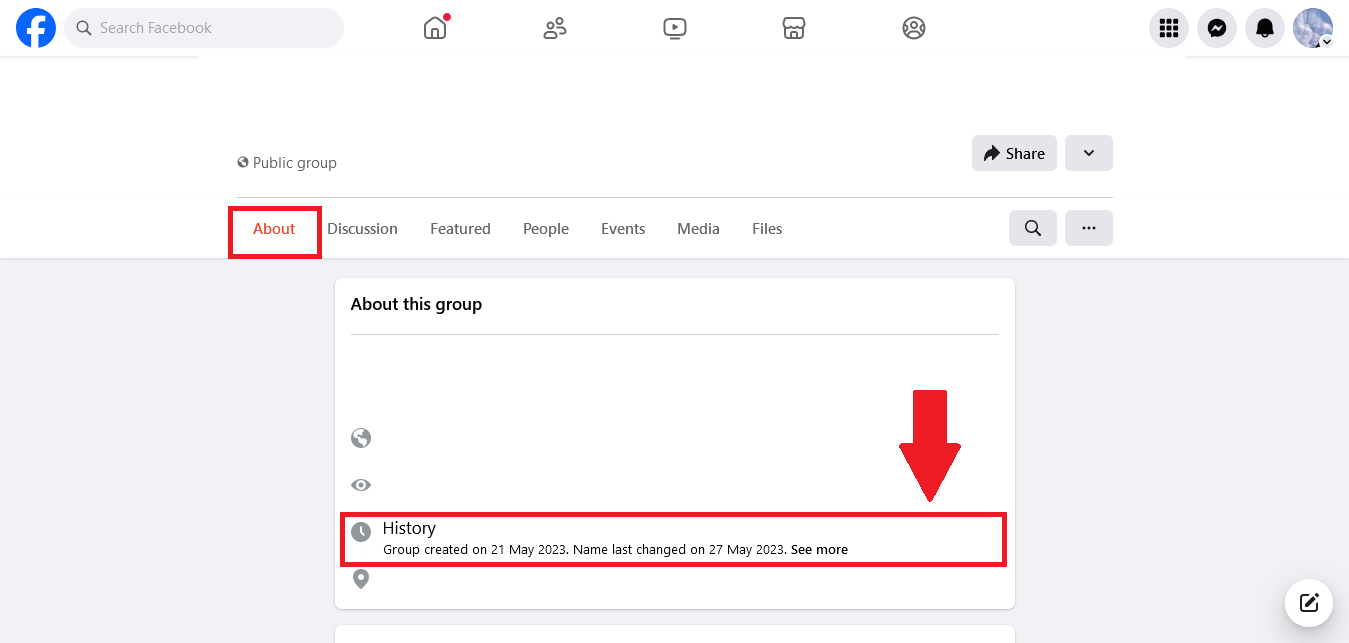
The “About” section of a Facebook group typically provides an overview of essential information about the group, including details like the group’s purpose, rules, and description. It may also display the creation date of the group, which can help indicate how long the group has been active. The creation date is often listed near the top of the “About” section along with the founding members or other historical details
You can find creation date by the following step:
- Open your Facebook app, first go to the search bar on the left side of your screen and search for the particular page. On the Facebook group page click on the about section, here you can find out the creation date of the particular page.
Group History (Group Admins Only):
If you are an admin of the Facebook Group, you can view the Group History, which includes a comprehensive log of the group’s activity over time.
Conclusion
In conclusion, discovering your Facebook joining or profile creation date is not only a simple task but also a meaningful way to reflect on your social media journey. This date serves as a significant marker, highlighting the evolution of your online identity, connections, and experiences over the years. Understanding when you joined the platform can evoke nostalgia and provide context for your digital interactions, while also fostering a sense of belonging within the ever-changing landscape of social media. Whether for personal reflection or to enhance your engagement with others, knowing your joining date enriches your understanding of your presence on Facebook and can deepen your appreciation for the relationships and memories cultivated along the way.