
Facebook was launched in 2004, but you are probably here to find something more specific — like when a Facebook account, page, or group was actually created. You may want to check your own joining date, verify when someone created their Facebook account, or see how old a Facebook page or group is.
The good thing is that Facebook shows this information in different places, if you know where to look. In this guide, you will learn how to find Facebook account, page, and group creation dates step by step.
Why You May Want To Know The Facebook Creation Date
The creation date of a Facebook account, page, or group can reveal important details about credibility, activity history, and authenticity. Many people check this information before trusting a profile, buying from a seller, joining a community, or interacting with a business online.
- Spot Fake Or Newly Created Accounts
Recently created Facebook profiles are often used for spam, scams, impersonation, or fake engagement. Checking the joining date can help you identify suspicious accounts before interacting with them. - Verify Business Credibility
A Facebook page that has existed for years usually appears more established and trustworthy than a newly created page with little activity or audience history. - Research Marketplace Sellers
Before buying through Facebook Marketplace, many users check account age to avoid fake sellers, temporary accounts, or potential scams. - Analyze Competitors And Brand History
Marketers and business owners often review page creation dates to understand when competitors entered the market and how long they have been building their online presence. - Check Community Trust In Facebook Groups
Older Facebook groups with a long activity history are generally seen as more reliable than newly created groups with limited moderation or engagement. - View Your Own Facebook History
Some users simply want to know when they joined Facebook for personal records, anniversaries, or account history tracking.
Disclaimer:
This guide is intended for informational and verification purposes only. The information should not be used to harass others, violate privacy, or misuse Facebook account details in any unethical or harmful way.
Find Different Creation Dates On Facebook
Facebook allows users to view different types of creation and joining dates, including personal accounts, business pages, and groups. Below, you will learn where to find each type of Facebook creation date and what information is publicly available.
Finding Own Facebook Joining Date
Follow these steps to find the original creation date of your Facebook account.
From About Section:
On Desktop:
- Log in to your Facebook account and go to your profile by clicking on your profile picture or name and go to the settings & privacy.

- After setting & privacy tap on settings.

- After settings click on personal information mentioned on account centre.
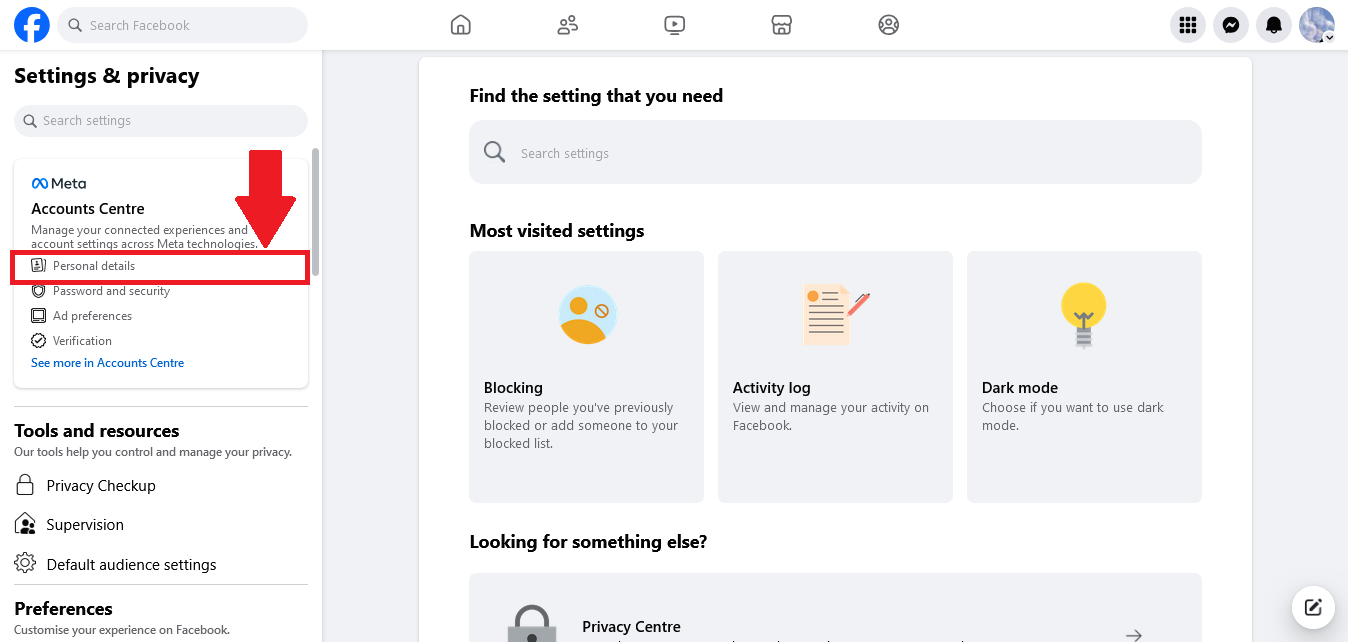
- On the page on account center select your information and permissions, tap on access your information here.
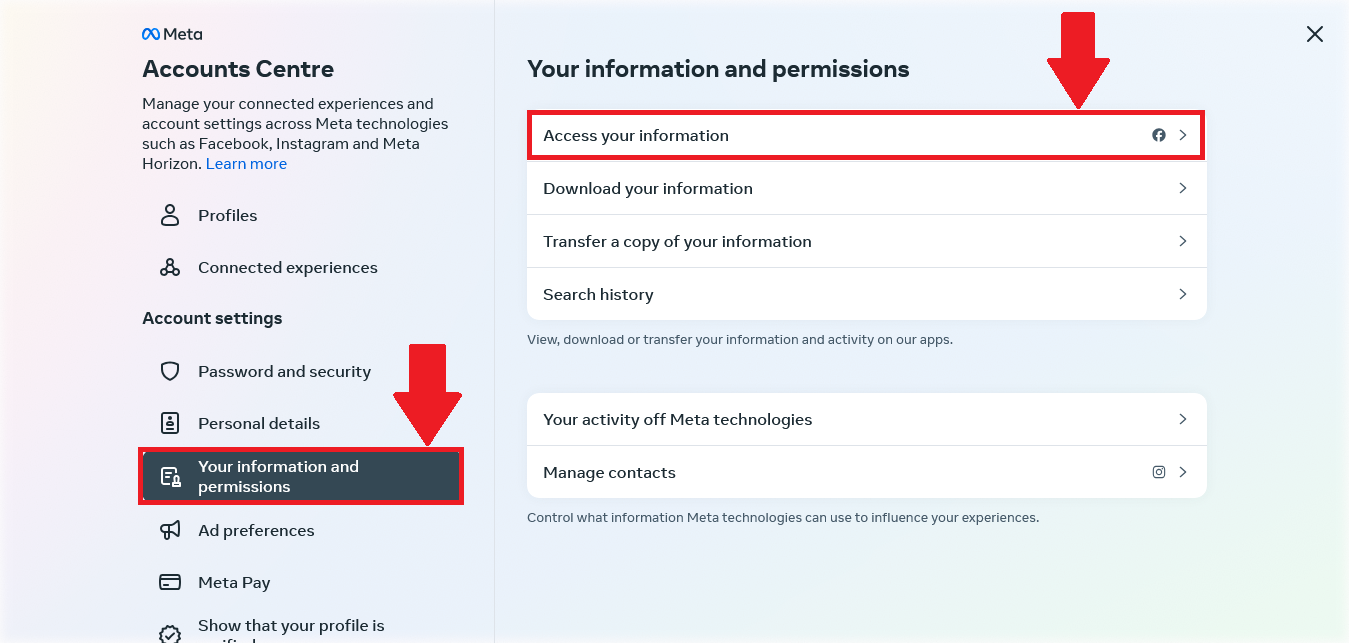
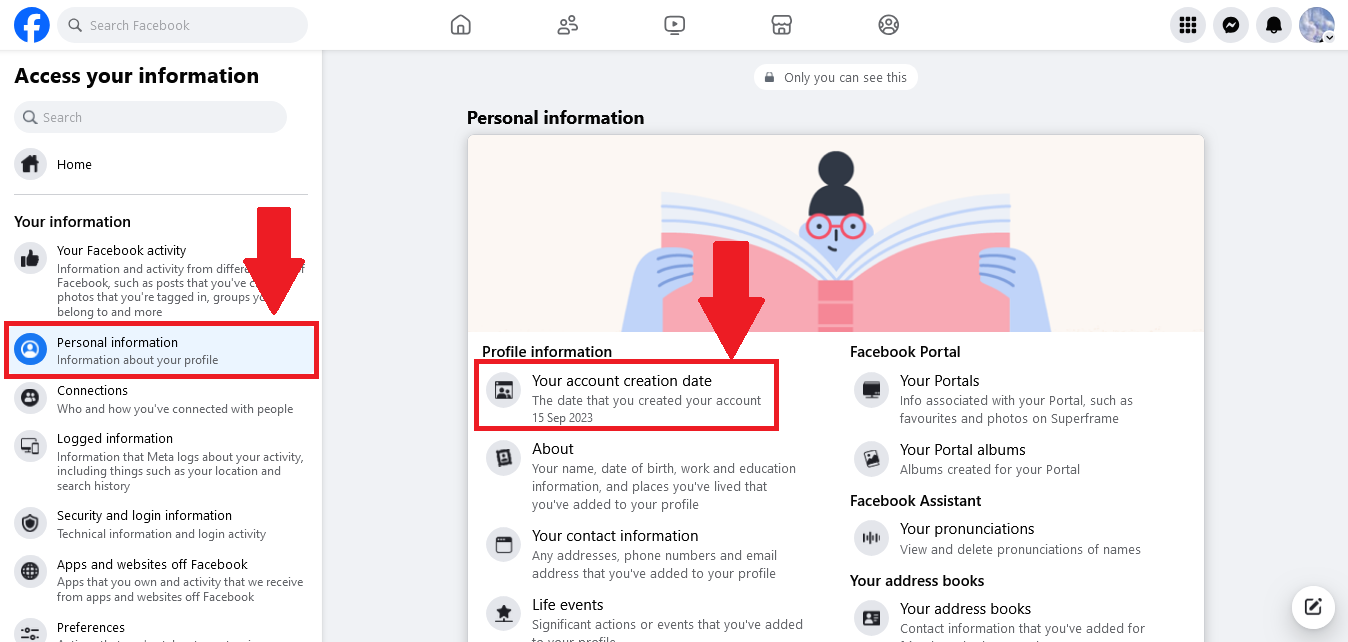
- On this tab, go on to personal information and In personal information, you can find your account creation date.
On Mobile:
Finding Someone else Facebook Joining Date
Finding Facebook Page Creation Date
Finding Facebook Group Creation Date
Conclusion
In conclusion, discovering your Facebook joining or profile creation date is not only a simple task but also a meaningful way to reflect on your social media journey. This date serves as a significant marker, highlighting the evolution of your online identity, connections, and experiences over the years. Understanding when you joined the platform can evoke nostalgia and provide context for your digital interactions, while also fostering a sense of belonging within the ever-changing landscape of social media. Whether for personal reflection or to enhance your engagement with others, knowing your joining date enriches your understanding of your presence on Facebook and can deepen your appreciation for the relationships and memories cultivated along the way.